
Devices & Setup
Matter / Thread device pairing fails
Diagnose Matter-over-Thread pairing failures: border router presence, network credentials, IPv6 reachability, 2.4 GHz channel collision, and the fabric model.
Start here: Identify the device's Matter transport (Wi-Fi or Thread)
Check the product box / docs for 'Matter over Thread' vs 'Matter over Wi-Fi'.
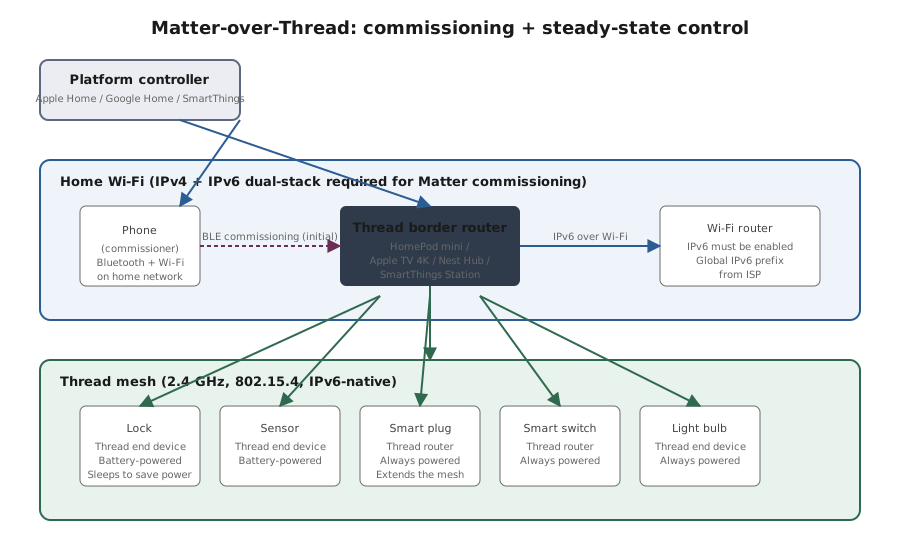
Matter-over-Thread architecture
Reference images and diagrams. Click any image to view full resolution.
Problem summary
Matter is the application protocol; Thread is the low-power mesh transport (Matter can also run over Wi-Fi). Pairing failures fall into four buckets — no border router available, network/Thread credential mismatch, IPv6 disabled on the home network, or the device is already commissioned into a different fabric. The right triage order isolates which.
At least one Thread border router exists and is online.
Apple Home: open Home app > tap house icon > Home Settings > Home Hubs & Bridges. Google Home: tap a Nest speaker > settings > Thread.
Platform app shows the border router: Apple Home > Home Hubs & Bridges; Google Home > the speaker > Thread; SmartThings > Hubs.
Avoid commissioning Matter devices on guest networks, factory-resetting a working device to add it to a second platform (use multi-admin), or running multiple Thread networks with overlapping channels.
Layer path
Step-by-step runbook
Start here. Do each check in order, compare it to the expected result, and stop when the evidence explains the failure or the safe stop point applies.
Identify the device's Matter transport (Wi-Fi or Thread)
Check: Check the product box / docs for 'Matter over Thread' vs 'Matter over Wi-Fi'.
Expected result: Transport identified.
If not: Thread devices need a border router; Wi-Fi devices don't.
Verify the network has what the transport needs
Check: Thread: at least one border router visible in platform app + IPv6 enabled on router. Wi-Fi: home Wi-Fi network reachable from device.
Expected result: All prerequisites satisfied.
If not: Add a border router for Thread; enable IPv6 if disabled.
Factory-reset the device if previously paired
Check: Follow manufacturer's reset procedure. Watch for the pairing-mode indicator.
Expected result: Device shows pairing mode (blinking pattern).
If not: Already-commissioned devices can't pair until reset OR multi-admin invite issued.
Open platform app and commission with QR or 11-digit code
Check: Apple Home / Google Home / SmartThings > Add Device > scan QR or enter setup code.
Expected result: Commissioning completes; device appears in platform app.
If not: If commissioning fails, check the platform's error message — maps to specific cause (no border router, IPv6, already-paired, distance).
Verify device control after commissioning
Check: From the platform app, send a test command (turn on/off / open lock / check sensor). Watch for prompt response.
Expected result: Device responds within a second or two.
If not: If response is slow/intermittent, Thread mesh weak — add intermediate router devices.
Set up multi-admin if cross-platform control is wanted
Check: In the original platform: device settings > Turn On Pairing Mode > displayed code > enter in second platform > complete commissioning.
Expected result: Device appears in both platforms; control works from both.
If not: Don't factory-reset to add to second platform — use multi-admin instead.
Did this solve your problem?
Your answer helps us improve this page.
No account or personal details. We store the page, answer, optional reason and day with a 90-day retention period. A random reference in this browser prevents repeat votes. Feedback privacy
Decision tree
If: Want to add a Matter-over-Thread device but no border router exists.
Then: Thread won't work without one.
Action: Add a HomePod mini / Apple TV 4K / Nest Hub / SmartThings Station / SkyConnect-equipped Home Assistant. THEN commission.
If: Pairing fails immediately with no useful error.
Then: Likely IPv6 disabled or phone on wrong network.
Action: Check router IPv6 enabled; switch phone to home Wi-Fi; retry.
If: Pairing partially succeeds then fails after 30+ seconds.
Then: Device commissioned but couldn't reach the border router after.
Action: Move device closer to border router (within 10 ft for initial commissioning); reduce 2.4 GHz Wi-Fi interference.
If: Device claims to be "already in use" or "already commissioned".
Then: Previously paired elsewhere.
Action: Factory-reset per manufacturer instructions; OR if intentional cross-platform addition, use multi-admin invite from the existing platform.
If: Multiple Matter devices fail to pair after a router/Wi-Fi change.
Then: Router/Thread credential change broke the existing Thread network.
Action: Verify Thread border router credentials in Apple Home > Hubs & Bridges > the border router > Network Credentials; re-pair devices that fell off.
If: Cross-platform commissioning needed (e.g., adding Apple Home device to Google Home).
Then: Use multi-admin, not re-pairing.
Action: In the original platform: open device > Settings > Turn On Pairing Mode > note setup code > enter in the second platform.
Evidence table
| Symptom | Evidence to collect | Likely layer | Next action |
|---|---|---|---|
| Platform app shows "No border routers found". | Apple Home > Home Hubs & Bridges section is empty for Thread; Google Home Thread devices list shows no border router. | Missing border router | Power on a Thread-capable speaker/hub; verify it appears in the platform app after a few minutes. |
| Router admin shows IPv6 = Disabled. | Router > Internet status > IPv6 row. | ISP or router config blocking IPv6 | Enable IPv6 in router config; contact ISP if not available. |
| Device pairs to Apple Home; Google Home commissioning of same device fails. | First commissioning succeeded; second attempt returns 'already paired' error. | Already in another fabric | Open device in Apple Home > Settings > Turn On Pairing Mode; use displayed code in Google Home. |
| Device pairs but commands lag 5+ seconds or fail intermittently. | Apple Home / Google Home shows the device 'unavailable' periodically. | Thread mesh weak (border router too distant) | Move a powered Thread router device (HomePod mini, smart plug) closer to the failing device to extend the mesh. |
Commands and settings paths
Verify Thread border router presence
Apple Home: open Home app > tap house icon > Home Settings > Home Hubs & Bridges. Google Home: tap a Nest speaker > settings > Thread.Where: On the phone with the platform app.
Expected: At least one Thread border router is listed and Connected.
Failure means: If empty, no Thread network exists for the device to join.
Safe next step: Add a Thread-capable speaker/hub; wait 5 min; re-check.
Check IPv6 status on the router
Router admin > Internet / WAN > IPv6 statusWhere: In the router's admin UI.
Expected: IPv6 shows Enabled with a global address (typically starts with 2 or 3 for IPv6 global unicast).
Failure means: Disabled IPv6 prevents Matter-over-Thread commissioning.
Safe next step: Enable IPv6; if not supported, switch to Matter-over-Wi-Fi devices.
Factory-reset a Matter device
Manufacturer documentation; typically a button-hold sequence (10 seconds) or power-cycle pattern (off-on 5 times).Where: Physically at the device.
Expected: Device shows pairing-mode indicator (blinking LED pattern per docs).
Failure means: Without factory-reset, a previously-commissioned device can't be re-paired.
Safe next step: Verify in pairing mode before opening platform app.
Initiate multi-admin invite from existing platform
Apple Home: open device > settings > Turn On Pairing Mode. Google Home: device settings > Add to another fabric. SmartThings: device > options > Multi-admin.Where: In the original platform's app on phone.
Expected: Setup code displayed; entering this code in the second platform completes cross-platform commissioning.
Failure means: Without multi-admin, the second platform can only commission via factory-reset (which removes from first platform).
Safe next step: Code is single-use and time-limited (typically 15 min).
Hardware and platform boundary
Change only when
- A dedicated Thread border router (HomePod mini ~$99, SkyConnect ~$40) is the right next purchase only when you actually have or plan to buy Thread devices; Matter-over-Wi-Fi devices don't need one.
Evidence that matters
- Thread border router presence, IPv6 enabled, and commissioning-time proximity matter most.
Evidence that does not matter
- Faster Wi-Fi router doesn't improve Thread performance; Thread uses 2.4 GHz only and a mesh of low-power radios.
Avoid
- Avoid commissioning Matter devices on guest networks, factory-resetting a working device to add it to a second platform (use multi-admin), or running multiple Thread networks with overlapping channels.
Related tool/checklist
Use the linked tool when you need a guided plan from your exact symptoms instead of a static checklist.
Device setup troubleshooterRelated problems
Last reviewed
2026-05-18 · Reviewed by HomeTechOps. Reviewed against the Connectivity Standards Alliance's Matter documentation and the Thread Group's network architecture overview; specifically the Thread border router model, IPv6 requirement, and the multi-admin commissioning pattern.
Sources/assumptions
- Assumes Matter 1.0+ device (released 2022 or later) and a current-version platform app (Apple Home iOS 16.1+, Google Home with Matter support, SmartThings with Matter).
- Assumes the device documentation lists 'Matter' on the box — some manufacturers ship Wi-Fi-only devices that aren't actually Matter; verify before troubleshooting Matter-specific issues.
Source-backed checks
HomeTechOps turns official docs and conservative safety rules into a shorter runbook. These links are the source trail for the page direction.
Get the deal & firmware alerts
Home Stack Field Notes: NAS deals, firmware changes worth acting on, restore-test reminders, and new decision guides — plus the capacity & backup sizing cheatsheets from our calculators. Unsubscribe anytime.
Subscribe on beehiiv