
Backups & Storage
Plex Remote Access Not Working: Port 32400, CGNAT, Relay
Diagnose Plex remote access failures from the server's Remote Access status: manually specify public port 32400, CGNAT, double NAT, UPnP vs manual port mapping, and the Plex Relay fallback.
Start here: Capture state
Plex Web > Settings > Remote Access (screenshot), Plex Media Server.log mapping lines, router WAN IP, current port forwards.
Evidence from the Plex server
Reference images and diagrams. Click any image to view full resolution.
Problem summary
Plex remote access depends on the Plex server reaching the public internet on a specific port. The Remote Access status in Plex server settings is the first piece of evidence — most failures fall into CGNAT, double-NAT, UPnP misbehavior, or a router that doesn't forward the configured port.
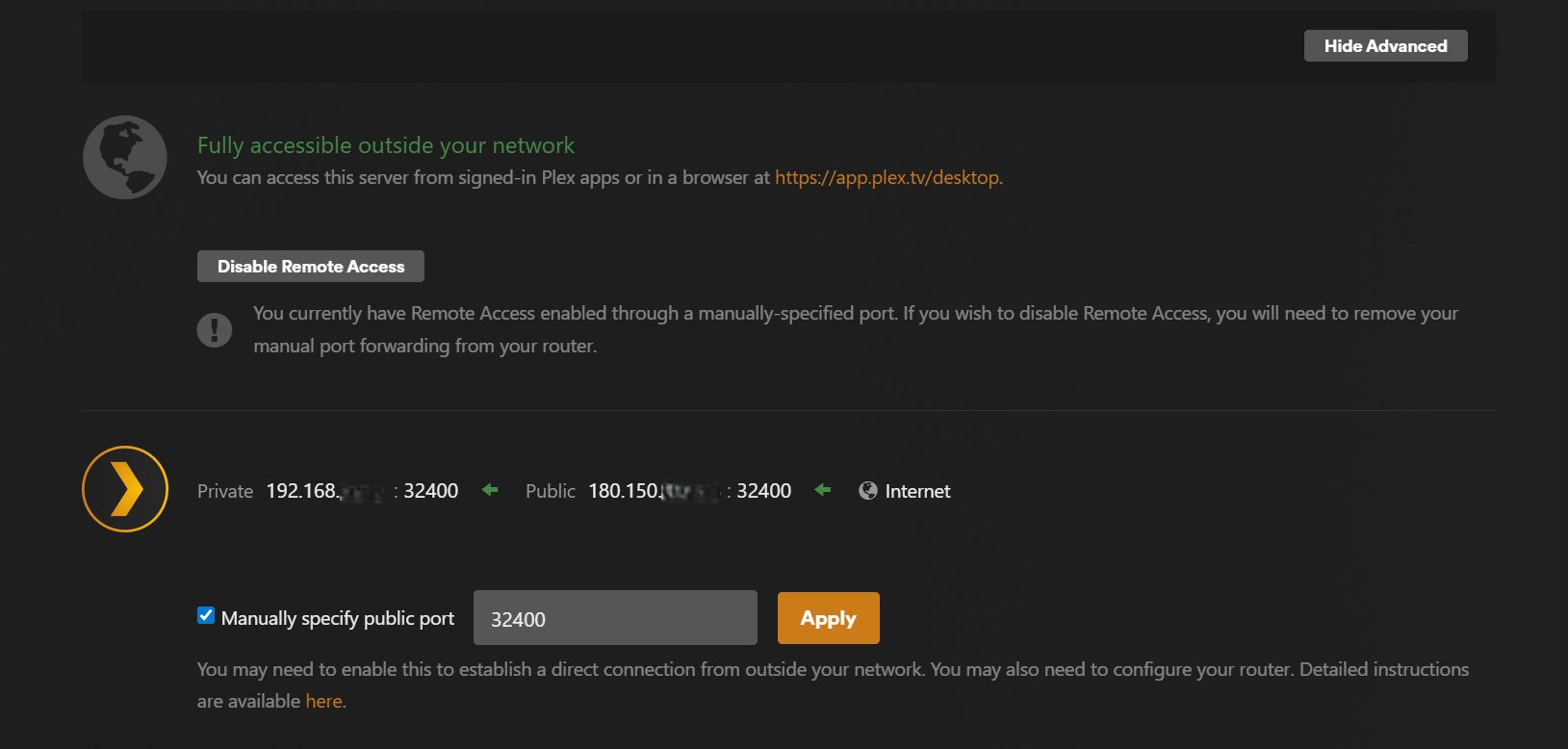
Open Plex Web on the server > Settings > Remote Access. Capture the exact status text.
Plex Web > Settings > Remote Access
Status reads 'Fully accessible outside your network' with a public IP and port, OR a specific failure phrase.
Stop and document the finding before paying for new hardware.
Layer path
Step-by-step runbook
Start here. Do each check in order, compare it to the expected result, and stop when the evidence explains the failure or the safe stop point applies.
Capture state
Check: the "Plex Remote Access status" command below (screenshot), Plex Media Server.log mapping lines, router WAN IP, current port forwards.
Expected result: You have written/captured evidence of every layer.
If not: Without it, every step below is a guess. Don't skip.
Rule out CGNAT
Check: Compare router WAN IP to whatismyip.com from the home network.
Expected result: Both match → continue troubleshooting normally. Different → CGNAT path.
If not: If CGNAT, the only options are ISP public-IP request, Plex Relay, or VPN-based access; port forwarding cannot work.
Safe stop: Stop and document the finding before paying for new hardware.
Eliminate double-NAT
Check: Check if there are two NAT devices in series (ISP gateway + your router). Bridge-mode the ISP device or DMZ your router behind it.
Expected result: Single NAT layer; router's WAN IP IS the public IP.
If not: If you can't bridge the ISP gateway, that's the project to push to the ISP.
Stabilize the Plex server's LAN IP
Check: Set a DHCP reservation at the router so the server always gets the same IP.
Expected result: Server IP is fixed; future port forwards stay valid.
If not: If the router doesn't support reservations, configure a static IP on the server's network interface.
Configure manual port mapping
Check: In Plex > Settings > Remote Access, enable Manually specify public port (non-default like 32500). In router, forward TCP 32500 → server LAN IP:32400. Click Retry in Plex.
Expected result: Remote Access status flips to 'Fully accessible' with the chosen external port.
If not: If still failing, port-test from cellular and check the server host firewall.
Safe stop: Stop before exposing port 32400 directly; use a non-default external port mapped to internal 32400.
Did this solve your problem?
Your answer helps us improve this page.
No account or personal details. We store the page, answer, optional reason and day with a 90-day retention period. A random reference in this browser prevents repeat votes. Feedback privacy
Decision tree
If: Router WAN IP != public IP shown on whatismyip.com.
Then: You're on CGNAT; port forwarding cannot work.
Action: Options: ask ISP for a public IPv4 (sometimes free, sometimes paid), use Plex Relay (2 Mbps cap), or connect via Tailscale/WireGuard to the home network. See the 3 workarounds for the full operator-grade path including IPv6 dual-stack and VPS+WireGuard.
If: Two NAT layers between Plex server and the internet.
Then: Double-NAT defeats UPnP and most manual forwards.
Action: Bridge-mode the ISP gateway, set your router as DMZ on the ISP gateway, or replace the ISP gateway with a pure modem.
If: Plex Remote Access status says 'Manual port mapping failed' or similar.
Then: Plex tried to forward, router rejected or UPnP is disabled.
Action: Set Manually specify public port in Plex (non-default like 32500), add a matching TCP forward in the router (external 32500 → server LAN IP:32400).
If: External port test fails on cellular but Plex is reachable on the LAN.
Then: Port is blocked between server and internet.
Action: Check Plex server host firewall (Windows Defender / Linux ufw), router firewall rule for the chosen external port, and ISP port-block on common ports.
If: Everything passes but apps still say 'Server not reachable' remotely.
Then: Likely a Plex account / app-level issue, not the network.
Action: Sign out and back in on the Plex app; confirm the same plex.tv account on both server and client; check plex.tv > Devices > Authorized apps.
Evidence table
| Symptom | Evidence to collect | Likely layer | Next action |
|---|---|---|---|
| WAN IP starts with 100.64.* / 100.65-127.* | Router admin > Internet status compared to whatismyip.com from the home network. | CGNAT (carrier-grade NAT) | Port forwarding cannot work. Use Plex Relay (2 Mbps cap) or a VPN-based remote access (Tailscale/WireGuard) instead. |
| UPnP active mappings table is empty even though Plex shows 'mapping established'. | Router admin > UPnP active mappings vs Plex Remote Access status. | UPnP disabled or broken on router; Plex sees a stale state | Disable UPnP entirely and use Manually specify public port + a static router forward. |
| External port test closed; Plex server reachable on LAN. | canyouseeme.org from outside vs Plex Web from home. | Firewall or port-block between server and internet | Check server host firewall, router forward, then ISP port policy. |
| Works at home, fails on cellular, works again on a friend's Wi-Fi. | Plex app behavior across three networks. | Specific upstream/CGNAT/firewall issue at the cellular carrier or a corporate Wi-Fi blocking | Not your home network's problem; test from another fresh network to confirm before making changes at home. |
Commands and settings paths
Plex Remote Access status
Plex Web > Settings > Remote AccessWhere: On the Plex Media Server host's web UI.
Expected: Status reads 'Fully accessible outside your network' with a public IP and external port.
Failure means: Any other status indicates which layer is failing.
Safe next step: Capture exact wording; that text is the diagnostic anchor.
Plex Media Server log mapping lines
grep -i 'mapping\|public address' "$PLEX_LOGS/Plex Media Server.log"Where: On the Plex server host ($PLEX_LOGS is ~/Library/Logs/Plex Media Server/ on macOS, /var/lib/plexmediaserver/.../Logs/ on Linux/Unraid).
Expected: Log shows 'Mapping established' or specific failure reasons.
Failure means: Without log lines, the failure layer is a guess.
Safe next step: Save log excerpt before changing settings; you need the before/after diff.
WAN IP vs public IP check
router admin Internet status compared to https://whatismyip.comWhere: Router admin UI from the home network, and any browser from the home network.
Expected: Both IPs match → you have a real public IPv4.
Failure means: Mismatch → CGNAT; port forwarding fundamentally cannot work.
Safe next step: Document this finding; it changes the entire solution path.
External port reachability test
canyouseeme.org with the configured external portWhere: From any browser on a different network (cellular hotspot is easiest).
Expected: Reports 'Success' for the configured port.
Failure means: 'Connection timed out' means the port is blocked somewhere between server and internet.
Safe next step: Test from cellular to bypass your home network's view of itself.
Hardware and platform boundary
Change only when
- Move to a Tailscale/WireGuard-based remote access only after confirming CGNAT or double-NAT can't be resolved cleanly at the router level.
Evidence that matters
- ISP plan with real public IPv4, router with reliable UPnP or static port forwarding, DHCP reservation support, and modern firmware matter.
Evidence that does not matter
- Faster Wi-Fi and mesh upgrades do not help remote access; the bottleneck is the WAN-side path.
Avoid
- Avoid DMZ-ing the Plex server, disabling firewalls, or forwarding port 32400 directly on the WAN; use a non-default external port and keep the server's host firewall on.
Related tool/checklist
Use the linked tool when you need a guided plan from your exact symptoms instead of a static checklist.
NAS storage and backup plannerRelated problems
Last reviewed
2026-05-07 · Reviewed by HomeTechOps. Reviewed for Plex remote-access triage using Remote Access status text, CGNAT detection, double-NAT identification, DHCP reservation, manual port mapping, external port reachability test, and Plex Relay / VPN fallbacks.
Sources/assumptions
- Assumes Plex Media Server is reachable on the home LAN (the in-network path works); the failure is specifically the away-from-home path.
- Assumes you have admin access to the home router. ISP-locked combo gateways or shared-internet setups may not allow the changes Plex remote access needs.
Source-backed checks
HomeTechOps turns official docs and conservative safety rules into a shorter runbook. These links are the source trail for the page direction.
Planning a purchase?
We keep a source-backed, price-free comparison so you can buy once and right. No star ratings, every spec cited.
NAS for Plex & Jellyfin: transcoding →Get the deal & firmware alerts
Home Stack Field Notes: NAS deals, firmware changes worth acting on, restore-test reminders, and new decision guides — plus the capacity & backup sizing cheatsheets from our calculators. Unsubscribe anytime.
Subscribe on beehiiv