
Mac
Mac Wi-Fi keeps dropping after a macOS update
Why a Mac's Wi-Fi keeps disconnecting after updating to macOS Tahoe (26) or macOS 27 — read diagnostics with wdutil, reset the network config, and fix the router.
Start here: Rule in the known bug
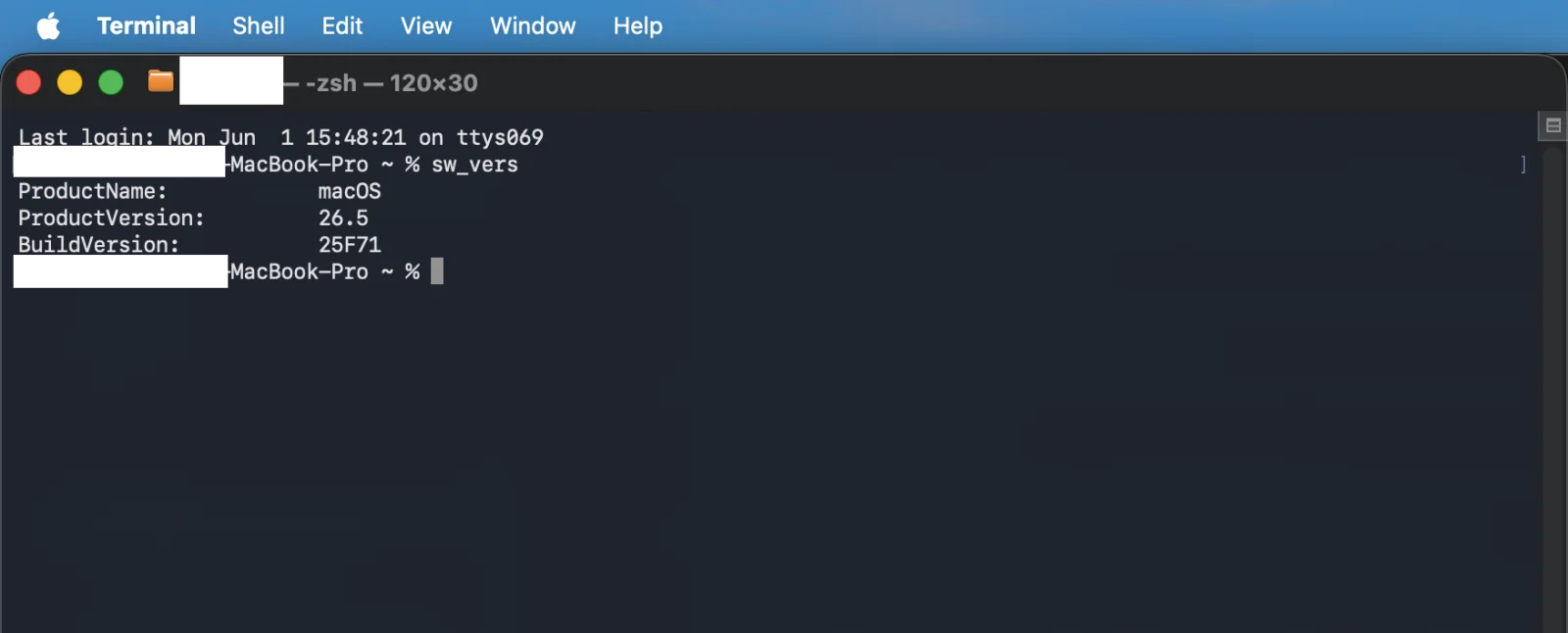
Run `sw_vers`; update to 26.4.1+ if on 26.4 with M5 hardware.
Problem summary
I'm here because my Mac's Wi-Fi keeps dropping — it disconnects every few minutes, drops when it wakes from sleep, or shows 'connected' with no internet, and it started (or got worse) after a macOS update. On macOS Tahoe this is usually a mix of a known point-release bug and a router setting the Mac has become pickier about. This page is the networking hub: confirm your version, read the real Wi-Fi diagnostics with `wdutil`, reset the network configuration cleanly, and fix the WPA2/WPA3, band-steering, and DHCP settings on the router that actually cause most repeated drops.
Run `sw_vers`; on 26.4 with an M5 MacBook, update to 26.4.1.
sw_vers
26.4.1 fixed the M5 Wi-Fi/content-filter regression; later releases carry the fix.
Move the plists aside (don't delete) so you can restore them.
Layer path
Step-by-step runbook
Start here. Do each check in order, compare it to the expected result, and stop when the evidence explains the failure or the safe stop point applies.
Rule in the known bug
Check: Run `the "Read the macOS version to match the known fix" command below`; update to 26.4.1+ if on 26.4 with M5 hardware.
Expected result: A known OS regression is eliminated as the cause.
If not: If unaffected, move to diagnostics.
Measure before guessing
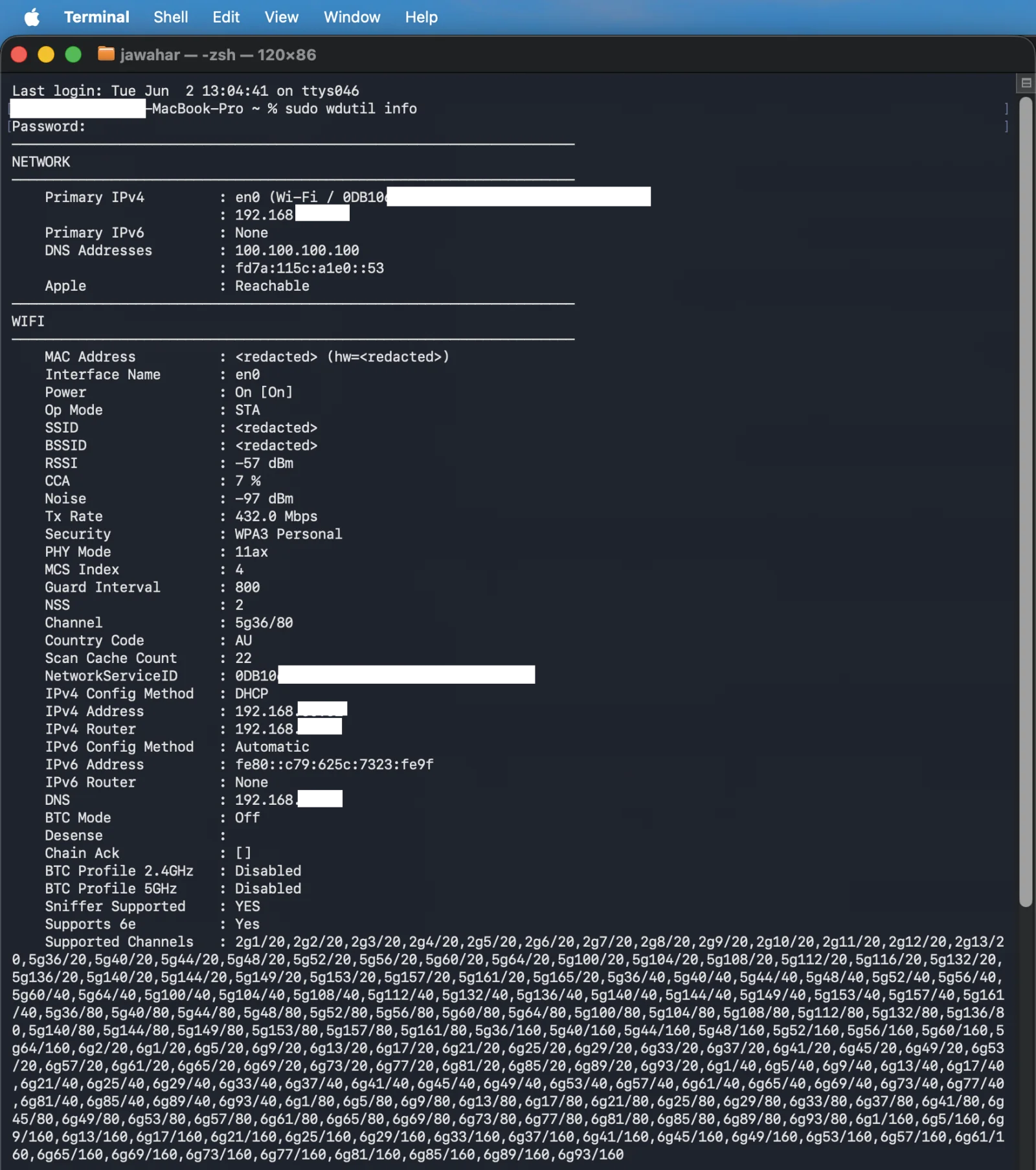
Check: Run `the "Read real Wi-Fi diagnostics (airport replacement)" command below` and read RSSI/noise/BSSID/PHY.
Expected result: You know whether this is signal/roaming or an auth/config issue.
If not: Weak/roaming signal → channels/placement; clean radio → config/router.
Refresh the Mac's network identity
Check: Renew the DHCP lease, then forget and re-add the network.
Expected result: A stale lease or saved profile is cleared and rebuilt.
If not: If a 169.254 address persists, fix DHCP on the router.
Rebuild the network config
Check: Move the SystemConfiguration plists aside and reboot.
Expected result: A corrupt post-update network profile is replaced with clean defaults.
If not: If it still drops, the problem is router-side — restore the plists and continue.
Stabilise the router
Check: Set a stable WPA2/WPA3 mode, lengthen the Group Rekey interval, split 2.4/5 GHz SSIDs.
Expected result: The Mac stops being kicked off and re-authenticating repeatedly.
If not: If only this Mac drops, weight the Mac-side steps; if many devices drop, this is the fix.
Did this solve your problem?
Your answer helps us improve this page.
No account or personal details. We store the page, answer, optional reason and day with a 90-day retention period. A random reference in this browser prevents repeat votes. Feedback privacy
Decision tree
If: macOS is 26.4 on an M5 MacBook Air/Pro and Wi-Fi drops.
Then: The 26.4 M5 Wi-Fi/content-filter regression.
Action: Update to 26.4.1 (or later), which Apple shipped specifically to fix it.
If: Only this Mac drops; `wdutil` shows a strong, steady signal.
Then: A corrupt SystemConfiguration profile or stale saved network.
Action: Renew DHCP and forget/re-add the network; if needed, move the SystemConfiguration plists aside and reboot to rebuild.
Safe stop: Move the plists aside (don't delete) so you can restore them.
If: Several devices drop, especially around the same times.
Then: Router-side: flaky WPA2/WPA3 transition, short rekey interval, or band-steering.
Action: Set a stable security mode, lengthen the Group Rekey interval, and split 2.4/5 GHz SSIDs to stop steering.
If: The Mac gets a 169.254 self-assigned address.
Then: DHCP isn't completing — the router didn't issue a lease.
Action: Renew the lease; reboot the router; check the DHCP pool isn't exhausted or the reservation broken.
If: Drops coincide with sleep/wake or only on battery.
Then: A power-management or wake interaction, not a plain radio fault.
Action: Test with 'Wake for network access' and Power Nap off; note the exact trigger.
Evidence table
| Symptom | Evidence to collect | Likely layer | Next action |
|---|---|---|---|
| Wi-Fi drops started on 26.4 on an M5 MacBook. | `sw_vers` shows 26.4; hardware is M5 Air/Pro. | Known macOS point-release regression. | Update to 26.4.1+. |
| Only this Mac drops; everything else is fine. | `wdutil` shows strong signal; other devices stay connected. | Mac-side network config (corrupt profile / stale network). | DHCP renew, forget/re-add, then SystemConfiguration plist rebuild. |
| Re-auths every few minutes across several devices. | Router uses WPA2/WPA3 transition with a short rekey interval, or band-steering on. | Router auth/roaming settings. | Stabilise security mode, lengthen rekey, split bands. |
| 'Connected' but no internet; address is 169.254.x.x. | Network settings show a self-assigned IP. | DHCP failure (router didn't lease an address). | Renew lease; reboot router; check DHCP pool/reservation. |
| BSSID keeps changing on the same SSID. | Repeated `wdutil info` shows different BSSIDs. | Roaming between APs/mesh nodes. | Pin channels, review mesh placement, or fix steering. |
Commands and settings paths
Read the macOS version to match the known fix
sw_versWhere: Terminal on the Mac.
Expected: Shows the exact point release (e.g. 26.4 vs 26.4.1).
Failure means: 26.4 on M5 hardware matches the regression fixed in 26.4.1.
Safe next step: Update to 26.4.1+ if affected; otherwise continue to diagnostics.
Read real Wi-Fi diagnostics (airport replacement)
sudo wdutil infoWhere: Terminal on the Mac (sudo required for full detail).
Expected: Prints SSID, BSSID, channel, RSSI, noise, Tx rate, PHY mode.
Failure means: Weak/changing RSSI or BSSID indicates signal/roaming rather than a software bug.
Safe next step: Treat signal/roaming with channel/placement; treat a clean radio as auth/config.
Renew the DHCP lease
System Settings → Network → Wi-Fi → Details → TCP/IP → Renew DHCP LeaseWhere: Network settings on the Mac.
Expected: The Mac gets a fresh router-range IP, clearing a stale or self-assigned (169.254) address.
Failure means: If a 169.254 address returns, DHCP isn't completing on the router.
Safe next step: Reboot the router and check its DHCP pool/reservation.
Rebuild a corrupt network configuration
/Library/Preferences/SystemConfiguration/ (move airport/network/preferences plists aside, then reboot)Where: Finder → Go to Folder on the Mac; reboot after moving the files.
Expected: macOS recreates clean network config files and re-learns the network.
Failure means: If drops continue after a clean rebuild, the cause is router-side.
Safe next step: Restore the moved plists if it didn't help, then work the router settings.
Hardware and platform boundary
Change only when
- Consider splitting 2.4 and 5 GHz onto separate SSIDs if band-steering on your router repeatedly bounces Apple devices — it's a config change, not a purchase.
- Upgrade an old or single-band router/AP if many devices drop and rekey/steering tuning doesn't hold; a modern AP with stable WPA3 and per-band control fixes the class of problem.
Evidence that matters
- A router with a stable WPA3 (or clean WPA2/WPA3 transition) implementation and a configurable Group Rekey interval.
- Per-band SSID control so you can stop aggressive band-steering.
- Good AP placement / channel planning so RSSI stays above roughly −70 dBm where the Mac sits.
Evidence that does not matter
- Top-end Wi-Fi 7 throughput numbers — they don't fix a drop caused by auth/rekey/steering.
- The Mac's own Wi-Fi chip generation — a base M5 is Wi-Fi 6E, and that's not why it's dropping.
- Mesh node count beyond coverage need — more nodes can worsen roaming churn, not help it.
Avoid
- Flaky WPA2/WPA3 transition mode paired with a very short rekey interval — a known Apple-device drop cause.
- Deleting the SystemConfiguration plists outright instead of moving them aside.
- MAC-based DHCP reservations/ACLs while the Mac uses a rotating Private Wi-Fi Address — set it Fixed/Off for that network.
Reading your Wi-Fi status from the command line
Reference images and diagrams. Click any image to view full resolution.
Related problems
Last reviewed
2026-06-02 · Reviewed by HomeTechOps. Reviewed against Apple's Wi-Fi connectivity and recommended-router-settings guidance, the macOS 26.4.1 Wi-Fi fix, and the removal of the legacy airport CLI (wdutil is the replacement); separates a true radio drop from a 169.254 DHCP failure and a 'connected, no internet' state, and weights router-side auth/rekey/band-steering settings as the usual cause of repeated drops once the Mac-side bug and config are ruled out.
Sources/assumptions
- Assumes a Mac on macOS Tahoe (macOS 26) dropping Wi-Fi; the 26.4 → 26.4.1 M5 fix is current to mid-2026 and should be re-verified against Apple's update notes.
- Router-side advice (WPA2/WPA3 transition, Group Rekey interval, band-steering, separate SSIDs) follows general Apple and AP-vendor guidance; exact menu labels vary by router.
- `wdutil` replaces the removed `airport` CLI; reading detailed info requires running it with sudo.
- macOS 27.0 Golden Gate (build 26A428) shipped 2026-09-14 and installs on Apple silicon Macs only — Intel Macs stay on Tahoe. The diagnostic sequence on this page is unchanged. Named Tahoe point-release bugs are tagged still-applies / Tahoe-only / unknown, and Time Machine over AFP no longer works on 27 (checked 2026-09-15).
Source-backed checks
HomeTechOps turns official docs and conservative safety rules into a shorter runbook. These links are the source trail for the page direction.
Get the deal & firmware alerts
Home Stack Field Notes: NAS deals, firmware changes worth acting on, restore-test reminders, and new decision guides — plus the capacity & backup sizing cheatsheets from our calculators. Unsubscribe anytime.
Subscribe on beehiiv