
Mac
Time Machine won't back up to a NAS on macOS Tahoe or 27
Why Time Machine over SMB to a Synology, QNAP, TrueNAS, or Unraid NAS fails on macOS Tahoe (26) or macOS 27, and the exact fixes for the two separate Tahoe bugs.
Start here: Pin the version
Run `sw_vers` and note the exact point release.
Problem summary
I'm here because Time Machine stopped backing up to my network drive after I updated to macOS Tahoe (macOS 26) — it says the backup disk isn't available, the backup disk image couldn't be created or accessed, or it just never finishes. On Tahoe this is usually one of two separate Apple bugs in how the Mac talks to a NAS over SMB, not a broken NAS. This page tells you which one you have and the exact fix, then covers the older sparsebundle problems that look the same.
Run `sw_vers` and read the exact ProductVersion before changing anything.
sw_vers
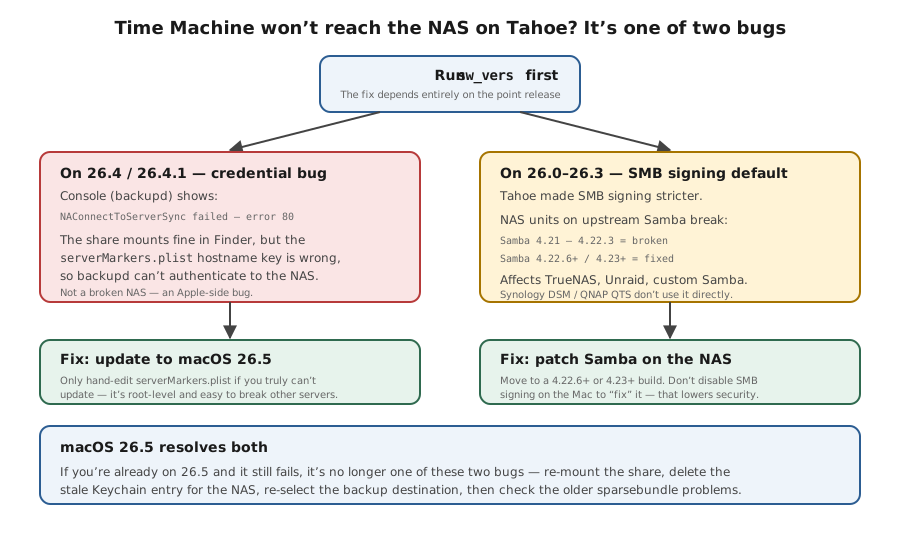
You can see whether you are on 26.4/26.4.1 (credential bug), 26.0–26.3 (SMB-signing change), or 26.5+ (both reportedly fixed).
Do not root-edit serverMarkers.plist unless updating is impossible and you have a second backup.
Layer path
Step-by-step runbook
Start here. Do each check in order, compare it to the expected result, and stop when the evidence explains the failure or the safe stop point applies.
Pin the version
Check: Run `the "Read the exact macOS version" command below` and note the exact point release.
Expected result: You know whether you're on 26.4, 26.0–26.3, or 26.5+.
If not: If not on macOS 26, skip the Tahoe bugs and go to sparsebundle/NAS steps.
Apply the version-specific fix
Check: On 26.4 → update to 26.5. On 26.0–26.3 with Samba NAS → update NAS Samba to 4.22.6+/4.23+.
Expected result: The OS-layer bug that matches your version is removed.
If not: If you cannot update yet, use the nsmb.conf bridge (26.0–26.3) and document it.
Safe stop: Do not root-edit serverMarkers.plist unless updating is impossible and you have a second backup.
Refresh credentials and destination
Check: Re-mount the share, remove and re-add the Time Machine destination, clear the stale Keychain entry.
Expected result: Time Machine has fresh, valid credentials for the NAS.
If not: If it still won't authenticate, recheck the NAS user's permissions on the share.
Confirm and size the target
Check: Verify the NAS folder is flagged as a Time Machine destination and the quota is 2–3× the Mac's used space.
Expected result: The Mac can create the sparsebundle and has room to keep history.
If not: If the folder was never flagged, set it, then re-add the destination on the Mac.
Repair or rebuild a bad image
Check: If a previously working sparsebundle is corrupt, attach it with `diskutil image attach --noMount` and run First Aid; if that fails, delete it.
Expected result: The image mounts and Time Machine resumes, or a clean new sparsebundle is created.
If not: If repair is uncertain, prefer a rebuild over trusting a half-fixed image.
Safe stop: Never trust the result until a small test restore succeeds.
Verify with a real restore
Check: Once a backup completes, restore one real file (and ideally a folder) from it.
Expected result: The restored file opens and matches the original.
If not: If the restore fails, the backup is not trustworthy — rebuild and add a second independent copy.
Did this solve your problem?
Your answer helps us improve this page.
No account or personal details. We store the page, answer, optional reason and day with a 90-day retention period. A random reference in this browser prevents repeat votes. Feedback privacy
Decision tree
If: macOS is 26.4 or 26.4.1 and Console shows the error-80 backupd line.
Then: The 26.4 serverMarkers.plist credential bug — the Mac authenticates with the wrong server key.
Action: Update to macOS 26.5, which reportedly fixes it.
Safe stop: Only hand-edit serverMarkers.plist if you genuinely cannot update — it is a root-level change that can break other server connections.
If: macOS is 26.0–26.3 and the NAS runs Samba 4.21–4.22.3.
Then: Tahoe's stricter SMB signing colliding with a broken NAS Samba version.
Action: Update the NAS to Samba 4.22.6+ or 4.23+; as a temporary bridge, set `/etc/nsmb.conf` on the Mac to `signing_required=yes` and `protocol_vers_map=6`.
Safe stop: Document any nsmb.conf edit so you can revert it once the NAS is updated.
If: The share mounts in Finder but Time Machine says the backup disk image couldn't be created or accessed.
Then: A stuck/half-written sparsebundle or a share that isn't flagged as a Time Machine target.
Action: Restart SMB on the NAS, create a fresh shared folder, and set that new folder as the Time Machine destination.
If: A previously working backup now reports the sparsebundle as damaged or won't mount.
Then: Sparsebundle corruption, usually from an earlier interrupted network write.
Action: Disable Time Machine, attach the image with `diskutil image attach --noMount`, run First Aid / fsck_apfs; if repair fails, delete it and rebuild.
Safe stop: Never trust a repaired or rebuilt network backup until you have run a real test restore from it.
If: The share won't mount in Finder at all, or asks repeatedly for a password.
Then: This is a network, SMB, or credential problem upstream of Time Machine.
Action: Fix share access (Keychain, NAS user permissions, SMB enabled) first, then return to Time Machine.
Evidence table
| Symptom | Evidence to collect | Likely layer | Next action |
|---|---|---|---|
| Backups fail immediately after updating to macOS 26.4. | `sw_vers` shows 26.4; Console shows `NAConnectToServerSync failed with error: 80`. | macOS 26.4 credential bug (serverMarkers.plist). | Update to 26.5; avoid root-editing the plist unless you cannot update. |
| Backups fail or disconnect mid-run on 26.1–26.3 with a TrueNAS/Unraid NAS. | NAS Samba version is in the 4.21–4.22.3 range. | SMB-signing default change vs broken NAS Samba. | Update NAS Samba to 4.22.6+/4.23+; optionally bridge with nsmb.conf on the Mac. |
| "The backup disk image could not be created." | Share mounts in Finder; NAS folder is not flagged as a Time Machine target, or an old sparsebundle is stuck. | Sparsebundle / NAS share-configuration layer. | Restart SMB, flag a fresh folder as the Time Machine target, re-add it on the Mac. |
| Several older backups suddenly reported as damaged. | The sparsebundle won't mount; First Aid finds errors. | Sparsebundle corruption from an interrupted write. | Repair with `diskutil image attach` + First Aid, or delete and rebuild; then test-restore. |
| Backups silently stop keeping history / oldest backups vanish. | NAS quota for the share is too small or unset; 'notify before deleting' is off. | NAS share sizing / retention. | Raise the quota to 2–3× the Mac's used space and enable delete notifications. |
Commands and settings paths
Read the exact macOS version
sw_versWhere: Terminal on the Mac (Applications → Utilities → Terminal).
Expected: Prints ProductName/ProductVersion/BuildVersion, e.g. macOS 26.5 (25F71).
Failure means: If ProductVersion is not 26.x, the Tahoe-specific bugs don't apply.
Safe next step: Match the version to the decision tree before any NAS or plist change.
Watch the backup live and read its phase
tmutil status ; tmutil currentphaseWhere: Terminal on the Mac, while a backup is attempting to run.
Expected: Shows Running = 1 and a phase (e.g. Copying), or an error if it can't start.
Failure means: If it never leaves a 'mounting'/'starting' phase, the connection or sparsebundle is the blocker.
Safe next step: Cross-check the destination with `tmutil destinationinfo` and re-add it if the ID is missing.
Mount a suspect sparsebundle for repair
diskutil image attach --noMount /Volumes/<share>/<Machine>.sparsebundleWhere: Terminal on the Mac, after `sudo tmutil disable` and mounting the NAS share (`hdiutil attach` is deprecated on macOS 27).
Expected: Attaches the image's backing volume (a diskN device) without auto-mounting it, ready for First Aid / fsck_apfs.
Failure means: If it won't attach at all, the image header is badly corrupt.
Safe next step: Run First Aid / `fsck_apfs -y`; if that fails, delete the sparsebundle and let Time Machine rebuild.
Re-claim an existing image instead of starting over
sudo tmutil inheritbackup /Volumes/<share>/<Machine>.sparsebundleWhere: Terminal on the Mac, after a NAS migration or moving the image.
Expected: Time Machine adopts the existing sparsebundle and resumes its history rather than making a new full backup.
Failure means: If it errors, the image identity no longer matches this Mac.
Safe next step: Verify the destination, then either inherit again or accept a fresh first backup.
Uncap a slow first backup (temporary)
sudo sysctl debug.lowpri_throttle_enabled=0Where: Terminal on the Mac, only during a large first backup.
Expected: Removes macOS's low-priority I/O throttle so the first backup runs much faster.
Failure means: If speed doesn't change, the bottleneck is the network or the NAS disk, not throttling.
Safe next step: Re-enable with `=1` when finished (it also resets on reboot).
Hardware and platform boundary
Change only when
- Add a second, independent backup target (an external SSD via Time Machine, or Backblaze) the moment you realize a single network sparsebundle is your only copy of irreplaceable data.
- Consider a NAS with snapshot support for the Time Machine share so a corrupt sparsebundle can be rolled back instead of rebuilt from zero.
Evidence that matters
- The NAS Samba/SMB version and SMB3 support — this is what Tahoe's signing change actually depends on.
- A backup volume sized to 2–3× the Mac's used space, with a quota and delete-notifications enabled.
- A healthy underlying NAS volume (no failing disk, not near-full) so the image isn't corrupted faster than it's written.
Evidence that does not matter
- AFP support — it's deprecated and irrelevant on modern macOS.
- Raw sequential throughput beyond gigabit for incremental backups — incrementals are small; first-backup time is the only place link speed matters much.
- The RAID level of the backup volume as 'backup insurance' — RAID is uptime, not a backup.
Avoid
- Relying on one NAS Time Machine backup as your only copy — network sparsebundles corrupt silently.
- Cheap USB-Ethernet adapters that drop mid-backup on Apple Silicon (the Realtek RTL8156/8153 class).
- Leaving the NAS on a broken Samba version (4.21–4.22.3) and blaming the Mac.
Which of the two Tahoe Time Machine bugs you have
Reference images and diagrams. Click any image to view full resolution.
Related tool/checklist
Use the linked tool when you need a guided plan from your exact symptoms instead of a static checklist.
Backup plan builderRelated problems
Last reviewed
2026-06-02 · Reviewed by HomeTechOps. Reviewed against Apple's Time Machine and macOS 26 update documentation, the four major NAS vendors' Time Machine-over-SMB guides, and 2026 reports of the two distinct Tahoe network-backup bugs; separates the 26.4 credential bug from the 26.0–26.3 SMB-signing change so the fix matches the exact point release.
Sources/assumptions
- Assumes a Mac on macOS Tahoe (macOS 26) backing up to a home NAS over SMB; AFP is treated as deprecated and out of scope.
- Tahoe point-release behavior (26.4 serverMarkers bug, 26.0–26.3 SMB-signing change) is based on vendor and community reports current to mid-2026; the 26.5 fix should be re-verified against Apple's update notes before relying on it.
- Per-NAS steps follow each vendor's official Time Machine-over-SMB documentation; exact menu labels can shift between firmware versions.
- macOS 27.0 Golden Gate (build 26A428) shipped 2026-09-14 and installs on Apple silicon Macs only — Intel Macs stay on Tahoe. The diagnostic sequence on this page is unchanged. Named Tahoe point-release bugs are tagged still-applies / Tahoe-only / unknown, and Time Machine over AFP no longer works on 27 (checked 2026-09-15).
Source-backed checks
HomeTechOps turns official docs and conservative safety rules into a shorter runbook. These links are the source trail for the page direction.
Planning a purchase?
We keep a source-backed, price-free comparison so you can buy once and right. No star ratings, every spec cited.
Synology vs UGREEN vs DIY NAS in 2026 →Get the deal & firmware alerts
Home Stack Field Notes: NAS deals, firmware changes worth acting on, restore-test reminders, and new decision guides — plus the capacity & backup sizing cheatsheets from our calculators. Unsubscribe anytime.
Subscribe on beehiiv