
Self-Hosting
Restore Immich After Server Failure: Database and Photos
Recover Immich with a matching database dump, original photo folders and version. Use an isolated restore rehearsal, verify files and metadata, then cut over.
Start here: Preserve the surviving backups and record the version
Keep the originals of your database dump, asset backup, docker-compose.yml and .env unchanged. Record the backup date, Immich image version, UPLOAD_LOCATION, external library mounts and database settings. Work with copies on a separate recovery host/directory.
Do not delete a surviving production database, run down -v, or point a rehearsal at production storage.
Problem summary
Keep the surviving copies intact. Immich recovery needs a compatible database backup plus the original photo/video files at the expected paths. Restore into a separate instance, verify downloaded originals and application metadata, then reconnect household clients.
Keep the originals of your database dump, asset backup, docker-compose.yml and .env unchanged. Record the backup date, Immich image version, UPLOAD_LOCATION, external library mounts and database settings. Work with copies on a separate recovery host/directory.
docker compose images
You know what recovery point and software version the backup represents.
Do not delete a surviving production database, run down -v, or point a rehearsal at production storage.
Layer path
Step-by-step runbook
Start here. Do each check in order, compare it to the expected result, and stop when the evidence explains the failure or the safe stop point applies.
Preserve the surviving backups and record the version
Check: Keep the originals of your database dump, asset backup, docker-compose.yml and .env unchanged. Record the backup date, Immich image version, UPLOAD_LOCATION, external library mounts and database settings. Work with copies on a separate recovery host/directory.
Expected result: You know what recovery point and software version the backup represents.
If not: A database dump alone contains metadata, not photos/videos. Asset folders alone do not recreate Immich’s users and file-path records. Inventory what survives before starting.
Safe stop: Do not delete a surviving production database, run down -v, or point a rehearsal at production storage.
Recreate a compatible, isolated deployment
Check: Obtain the official release Compose file and use the backup’s matching Immich version first. Use fresh database storage, a separate Compose project/container names and a loopback-only or restricted test port. Keep mobile uploads, reverse proxy and automated jobs away from the rehearsal.
Expected result: The recovery stack cannot overwrite or receive traffic intended for the old instance.
If not: If the backup predates v2.5.0, use the official documentation version selector and its manual restore instructions. The backup/restore process changed in v2.5.0; do not mix arbitrary current CLI commands with an old dump.
Restore the filesystem at the paths the database expects
Check: Populate the new UPLOAD_LOCATION from the backup, retaining backups, encoded-video, library, profile, thumbs and upload directories where present. Recreate external-library mounts at the same container paths. Preserve ownership so the service can read/write its files.
Expected result: The restored paths and external mounts match the saved instance, and original photos/videos are present.
If not: Do not flatten nested directories or import old upload/library files as new mobile uploads. Generated thumbnails/encoded files can be rebuilt where supported, but originals cannot be recreated from the database.
Use the supported database restore for this version
Check: For the current UI flow, start the isolated services and choose Restore from backup on the welcome screen. Review storage integrity checks, choose the matching dump (or upload the .sql.gz through the supported selector), and confirm only on the recovery instance.
Expected result: The database restore and health check complete, and the recovered account can log in.
If not: On an existing instance the matching control is Administration → Maintenance → Restore database backup. This replaces its current database: take a fresh backup first and do not treat it as a harmless merge.
Safe stop: If version compatibility, folder checks or database restore fail, preserve logs and snapshots before retrying; do not reset surviving storage as a shortcut.
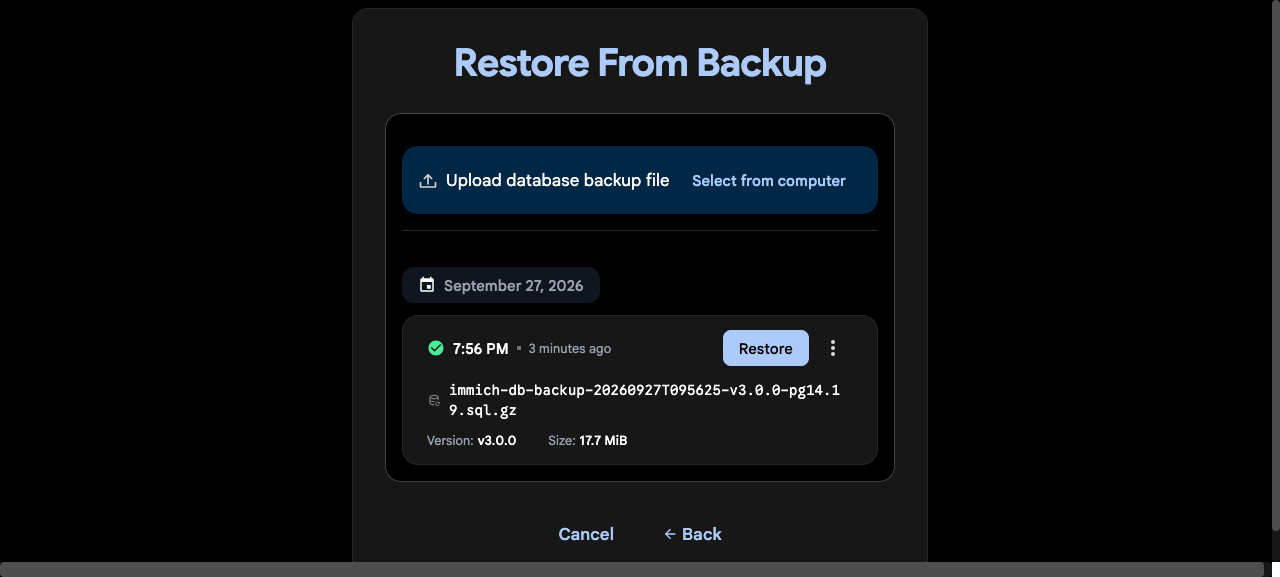
Verify originals and application metadata
Check: Compare users and asset totals with recorded backup evidence. Open representative old/new photos and videos, download originals, compare file hashes against the backup and check dates, albums, favourites, sharing and external libraries.
Expected result: Selected original downloads match the backup and required metadata/workflows are present.
If not: A login page or visible thumbnail is not enough. Missing originals usually require a mount/path/backup inventory investigation before regenerating derived content.
Cut over only after the rehearsal passes
Check: Retain a written recovery checklist, the tested version and backup timestamp. Keep the old backup intact, upgrade through the supported path separately, then deliberately route clients to the recovered instance and verify one new upload plus a fresh database/files backup.
Expected result: Existing library and new uploads both work; a new recoverable backup exists.
If not: Pause cutover when any sample original, account, library mount or restore check fails. Keep the old copies until an independent backup of the recovered system is verified.
Did this solve your problem?
Your answer helps us improve this page.
No account or personal details. We store the page, answer, optional reason and day with a 90-day retention period. A random reference in this browser prevents repeat votes. Feedback privacy
Decision tree
If: Only the automatic database dump survives
Then: It contains database state, not original photos/videos
Action: Locate a separate original-file backup before promising complete recovery.
If: Original folders survive but no usable database dump exists
Then: Original files are valuable, but managed-library metadata/state is missing
Action: Preserve those copies; investigate database backups rather than assuming a folder scan recreates the old instance.
If: The dump predates v2.5.0 or restore reports version/schema conflicts
Then: The documented restore process or schema may not match this backup
Action: Use compatible software and the corresponding documentation version; retain all copies and failure logs before retrying.
If: The account restores but an original download fails
Then: Storage paths, external mounts or the filesystem recovery point may be wrong
Action: Compare the database’s expected paths with restored mounts/files; do not accept thumbnail-only recovery.
If: Original hashes match and required users/albums are present
Then: The sampled recovery checks passed for this tested scope
Action: Verify videos/external libraries separately where needed, then plan cutover and a fresh independent backup.
Evidence table
| Symptom | Evidence to collect | Likely layer | Next action |
|---|---|---|---|
| Only the automatic database dump survives | Backup inventory, UPLOAD_LOCATION/external mounts and original-file availability | It contains database state, not original photos/videos | Locate a separate original-file backup before promising complete recovery. |
| Original folders survive but no usable database dump exists | Surviving originals, backups folder, saved configuration and database recovery points | Original files are valuable, but managed-library metadata/state is missing | Preserve those copies; investigate database backups rather than assuming a folder scan recreates the old instance. |
| The dump predates v2.5.0 or restore reports version/schema conflicts | Backup’s application version, restore stack version and exact error | The documented restore process or schema may not match this backup | Use compatible software and the corresponding documentation version; retain all copies and failure logs before retrying. |
| The account restores but an original download fails | Asset ID/original path, mount mapping, file presence and download response | Storage paths, external mounts or the filesystem recovery point may be wrong | Compare the database’s expected paths with restored mounts/files; do not accept thumbnail-only recovery. |
Commands and settings paths
Record the existing application version
docker compose imagesWhere: Surviving original deployment, read-only; keep the output privately with the backup
Expected: The exact server tag/digest and other image versions are recorded
Failure means: A floating release tag is not an exact recovery version
Safe next step: Record the running image/digest where possible and obtain the matching release configuration.
Validate recovery configuration
docker compose -p immich-recovery config --quietWhere: Only the separate recovery directory, after filling the saved .env
Expected: Compose validates without printing secrets
Failure means: Missing variables or an invalid release Compose file
Safe next step: Fix the configuration and confirm all storage paths belong to recovery, not production.
Start isolated services
docker compose -p immich-recovery up -dWhere: Separate recovery project; unique names, fresh DB storage and restricted host port
Expected: Services start on the planned recovery endpoint
Failure means: A reused container name, occupied port or production mount defeats isolation
Safe next step: Review container names, mounts and host binding before retrying.
Database restore control
Welcome → Restore from backup; existing instance: Administration → Maintenance → Restore database backupWhere: Web interface of the recovery instance only
Expected: Folder integrity checks, selected compatible dump, successful restore health check
Failure means: Restore replaces the current database; it is not a merge or a file-only import
Safe next step: Preserve a fresh backup and stop on failed folder checks or version mismatch.
Compare a downloaded original
sha256sum "/path/to/backup/original.jpg" "/path/to/downloaded/original.jpg"Where: Linux recovery operator shell; substitute two copies of the same sample
Expected: Both SHA-256 digests agree
Failure means: Wrong original, missing file, damaged copy or transformed download
Safe next step: Check the asset’s original path and download choice; do not accept thumbnail-only recovery.
Hardware and platform boundary
Change only when
- Replace hardware only if it cannot safely host recovered data and the supported application version.
Evidence that matters
- Backup timestamp and software version, original-file presence/hashes, database health, mount paths and restored accounts/albums.
Evidence that does not matter
- A successful application start without checking the actual data or result.
Avoid
- Do not use a copied live PostgreSQL data directory as the only backup; do not run destructive resets against surviving production data.
Related problems
Last reviewed
2026-09-27 · Reviewed by HomeTechOps. Source-reviewed 2026-09-27 against Immich’s current database and filesystem recovery documentation. Current UI controls are distinguished from pre-v2.5.0 CLI recovery. A HomeTechOps rehearsal on Immich v3.0.0 restored an account, one album and three synthetic PNG originals through the onboarding UI on an isolated native-Linux Docker VM. All three downloaded-original SHA-256 hashes matched the source samples. Video, external libraries, mobile background uploads and cross-version upgrades were not tested.
Sources/assumptions
- Current UI restore flow is source-reviewed; backups before v2.5.0 use version-specific documentation. A recovery instance must have fresh database storage and no production mounts or client traffic.
Source-backed checks
HomeTechOps turns official docs and conservative safety rules into a shorter runbook. These links are the source trail for the page direction.
Planning a purchase?
We keep a source-backed, price-free comparison so you can buy once and right. No star ratings, every spec cited.
Synology vs UGREEN vs DIY NAS in 2026 →Get the deal & firmware alerts
Home Stack Field Notes: NAS deals, firmware changes worth acting on, restore-test reminders, and new decision guides — plus the capacity & backup sizing cheatsheets from our calculators. Unsubscribe anytime.
Subscribe on beehiiv