
Wi-Fi & Network
CGNAT detected: no public IP for home remote access
Diagnose when your ISP put you behind CGNAT (port forwarding broken, WAN IP showing 100.64.x.x), confirm it, then pick a mesh VPN, tunnel, or VPS relay.
Start here: Confirm CGNAT (not double NAT, not ISP port-blocking)
Compare router WAN IP, whatismyip.com result, and traceroute hops 1-3.
What the diagnostic actually looks like in a terminal
Reference images and diagrams. Click any image to view full resolution.
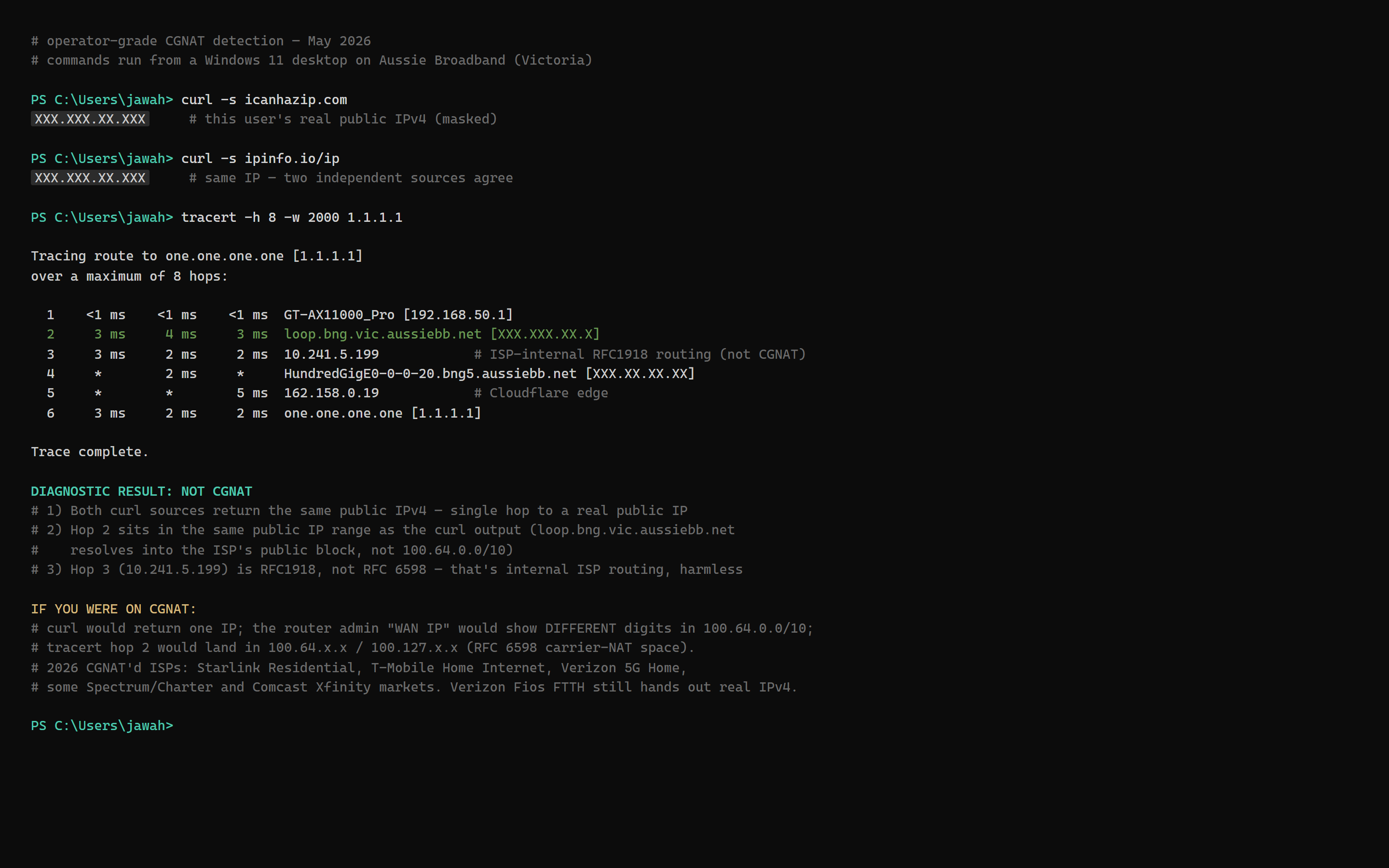
Problem summary
CGNAT (Carrier-Grade NAT, RFC 6598) is what ISPs use to share a single public IPv4 among many customers. Your router gets a 100.64.0.0/10 'WAN' address that the public internet can't reach. Port forwarding in your router is theater — the ISP's NAT layer is rejecting inbound. Common after FTTH rollouts (many fiber ISPs default to CGNAT to conserve IPv4) or after migrating to T-Mobile Home Internet, Starlink, Verizon 5G Home, Vodafone mobile/FTTP, etc. Three workarounds exist: mesh VPN (Tailscale — easiest for personal admin), reverse tunnel (Cloudflare Tunnel — public URLs without exposing a port), or VPS-relay with WireGuard (full control, $5-10/mo VPS cost).
Find router WAN IP in admin UI.
Router admin (192.168.1.1 or 192.168.0.1) > Internet/WAN status > note WAN IPv4 address
Router admin > Internet/WAN status shows current WAN IPv4 address.
Stop if SSH to the NAS via Tailscale IP fails — diagnose ACL or firewall before proceeding.
Layer path
Step-by-step runbook
Start here. Do each check in order, compare it to the expected result, and stop when the evidence explains the failure or the safe stop point applies.
Confirm CGNAT (not double NAT, not ISP port-blocking)
Check: Compare router WAN IP, whatismyip.com result, and traceroute hops 1-3.
Expected result: All three agree on CGNAT: WAN IP in 100.x range; whatismyip.com differs; traceroute shows 100.x at hops 1-3.
If not: If signals don't all agree, you may have a different problem (double NAT or port blocking) — that needs a different fix.
Decide what use cases you need remote access for
Check: List: admin SSH (you only), public web URLs (anyone with the link), SMB file copy (you + your devices), Plex streaming, public webhook receiver.
Expected result: Clear use-case list; each use case has a tool that fits.
If not: Most home operators end up needing 2-3 use cases — that's normal, plan for both Tailscale + Cloudflare Tunnel.
Install Tailscale on the NAS for admin/personal access
Check: Synology: Package Center > Tailscale. Unraid: Apps > Tailscale plugin. TrueNAS Scale: Apps catalog > Tailscale.
Expected result: `tailscale status` shows NAS with a Tailscale IP; remote devices can reach the NAS via Tailscale IP.
If not: On Synology, run the boot-time `configure-host` script via Task Scheduler — required for TUN sandbox passthrough.
Safe stop: Stop if SSH to the NAS via Tailscale IP fails — diagnose ACL or firewall before proceeding.
Install Cloudflared on the NAS for public URLs (if needed)
Check: Cloudflare Zero Trust dashboard > Networks > Tunnels > Create tunnel; install cloudflared in Docker on the NAS with the tunnel token; add public hostnames with Access policies attached.
Expected result: Public hostname `service.example.com` resolves to CF edge and routes to your NAS service through the tunnel.
If not: Every public hostname needs an Access policy (email allow-list / SSO) — without one, the URL is publicly reachable.
Test inbound paths from outside
Check: From cellular: SSH to NAS via Tailscale IP; reach public hostname via Cloudflare Tunnel; confirm both work.
Expected result: Both paths succeed.
If not: If Tailscale uses DERP relay (not direct), latency is higher but functional.
Optional: ask the ISP for public IPv4
Check: Phone or chat the ISP support; ask 'is a public IPv4 add-on available, and what does it cost'.
Expected result: Either: free static IP available; $5-15/mo paid add-on; flat refusal (T-Mobile Home Internet, some FWA plans).
If not: If available and affordable, this restores normal port-forward functionality. If refused, the workarounds above are your only path.
Did this solve your problem?
Your answer helps us improve this page.
No account or personal details. We store the page, answer, optional reason and day with a 90-day retention period. A random reference in this browser prevents repeat votes. Feedback privacy
Decision tree
If: WAN IP in 100.64.0.0/10 + whatismyip.com differs.
Then: CGNAT confirmed.
Action: Pick a workaround: Tailscale (admin/personal) OR Cloudflare Tunnel (public URLs) OR VPS+WireGuard (raw TCP/UDP).
If: WAN IP is RFC1918 (192.168.x.x or 10.x.x.x) and a separate device is doing NAT.
Then: Double NAT, not CGNAT. Different problem.
Action: Put the ISP modem in bridge mode, OR put your router in DMZ mode for the modem's WAN-side IP. Port forwarding will work after.
If: WAN IP is a regular public address but port forward still fails.
Then: ISP-level firewall (port 25, 80, 443 commonly blocked on consumer plans).
Action: Test using a non-standard port (e.g. 8443 for HTTPS). If that works, the ISP is port-blocking. Switch to Cloudflare Tunnel or use the unblocked port.
If: CGNAT confirmed and need to share a single public URL with non-technical visitors.
Then: Cloudflare Tunnel + Access policy.
Action: Install cloudflared on the NAS; create public hostname; attach Access policy. See /guides/home-remote-access-tailscale-vs-cloudflare-tunnel.
If: CGNAT confirmed and need admin SSH + full LAN access from your own devices only.
Then: Tailscale.
Action: Install Tailscale on the NAS and on every device that needs access. Sign in to the same Tailscale account. Configure ACL.
If: ISP offers an opt-out (Aussie Broadband, some FTTH ISPs, Starlink Priority plan).
Then: Pay for or request the public IPv4 add-on.
Action: Cheaper monthly than running a VPS + WireGuard yourself; restores normal port-forward functionality.
Evidence table
| Symptom | Evidence to collect | Likely layer | Next action |
|---|---|---|---|
| Router WAN IP shows 100.64.x.x – 100.127.x.x. | Router admin > Internet/WAN status. | RFC 6598 CGNAT shared address space. | Confirm with traceroute; choose a workaround based on use case. |
| whatismyip.com IP ≠ router WAN IP, and router WAN starts with 100.x. | Web browser from a LAN device. | Confirmed CGNAT — the public IP isn't yours. | Don't bother with DDNS pointing at a shared CGNAT IP; install Tailscale or Cloudflare Tunnel. |
| Plex Remote Access shows 'Not available outside your network' even after port forward + DDNS configured. | Plex Web > Settings > Remote Access. | ISP is NAT'ing the inbound at CGN; router port forward is irrelevant. | Switch Plex to Tailscale (preferred for streaming), or use Plex Pass + Plex Relay (slow), or set up Cloudflare Tunnel (TOS gray area for video). |
| ISP plan is T-Mobile Home Internet / Verizon 5G Home / Starlink residential / Three UK. | Customer billing portal / plan details. | These plans default to CGNAT; some refuse to offer public IPv4 at any price (T-Mobile Home Internet). | Plan workarounds around CGNAT permanently; don't expect ISP to change. |
Commands and settings paths
Check WAN IP from router admin
Router admin (192.168.1.1 or 192.168.0.1) > Internet/WAN status > note WAN IPv4 addressWhere: In router admin UI from a LAN device.
Expected: WAN IP shown is either a regular public address (e.g. 73.x.x.x) or in 100.64.0.0/10 (CGNAT).
Failure means: If WAN IP is in 192.168.x or 10.x range, you have double NAT (different problem from CGNAT).
Safe next step: Capture the WAN IP for comparison with whatismyip.com.
Get public IPv4 from outside
From a LAN device: `curl ifconfig.me` (or open whatismyip.com)Where: Terminal or browser from LAN device.
Expected: Returns the IPv4 the public internet sees you as.
Failure means: If this differs from the router WAN AND the router WAN is in 100.x range, CGNAT is confirmed.
Safe next step: Cross-reference the two values to make the CGNAT determination.
Run traceroute to confirm CGN gateway
`tracert 8.8.8.8` (Windows) or `traceroute 8.8.8.8` (Linux/Mac)Where: From a LAN device.
Expected: Shows the path from your LAN to the internet. Hops 1-3 in 100.64.x.x range = ISP CGN; hops past that show the ISP's edge.
Failure means: If hops 1-3 are all RFC1918 (192.168, 10.x), you're behind double NAT not CGNAT — bridge mode the modem.
Safe next step: Capture full output as evidence; helpful for ISP support calls.
Test inbound reachability from cellular
From a phone on cellular (not home Wi-Fi): try `curl http://<router-WAN-IP>:<port>` or canyouseeme.orgWhere: On a cellular network or VPN'd to an external network.
Expected: If port forwarding worked, the test should return the service response or a TCP-level accept. If CGNAT'd, expect timeout or connection refused.
Failure means: Cellular IPv4 is often also CGNAT'd; this is fine for the test since you're testing INBOUND to your home, not outbound from cellular.
Safe next step: Confirms whether the chosen port forward is reaching your home at all.
Test Tailscale install + reachability
Install Tailscale on the NAS + a remote device; `tailscale status` on bothWhere: SSH to NAS for the NAS-side check; CLI on remote device.
Expected: Both devices appear in tailnet with `direct` or `relay` status; pings between Tailscale IPs (100.x.y.z range) succeed.
Failure means: If relay-only, NAT punching failed — connection works but with +20-50ms latency. Acceptable for admin but slower for streaming.
Safe next step: Confirms the CGNAT workaround is in place before relying on it.
Hardware and platform boundary
Change only when
- Upgrade ISP plan to one with public IPv4 (Aussie Broadband $5/mo residential add-on, Starlink Priority/Local Priority business plan for a dynamic public IPv4, Vodafone UK FTTC business, some altnet FTTPs) — only when the workarounds prove insufficient for your specific use cases.
Evidence that matters
- A real public IPv4 (vs static CGNAT — yes, some ISPs offer that, also useless) is what matters. Verify the address is reachable from outside before relying on it.
Evidence that does not matter
- ISP-side router replacement, fancier home routers, mesh Wi-Fi systems — none change CGNAT state because the CGN is upstream of all your equipment.
Avoid
- Don't pay for an 'IPv4 fast lane' or 'gaming priority' add-on expecting it to fix CGNAT — those are QoS features, not addressing changes. Read the ISP's fine print specifically for 'public IPv4 address' or 'static public IP'.
Related tool/checklist
Use the linked tool when you need a guided plan from your exact symptoms instead of a static checklist.
NAS setup plannerRelated problems
Last reviewed
2026-05-18 · Reviewed by HomeTechOps. Reviewed against RFC 6598 (CGNAT shared address space), ISP CGNAT policy reports from ISPreview UK and WhistleOut AU, and community pain threads on r/homelab + r/HomeNetworking + the Plex forum (the recurring 'Lost Remote Access' / 'CG-NAT' thread pattern). Tailscale and Cloudflare Tunnel install procedures verified against vendor docs.
Sources/assumptions
- Page assumes the home has outbound internet (mesh VPN and reverse tunnel both need that; CGNAT only blocks inbound).
- ISP-specific behavior may shift — verify current state of T-Mobile Home Internet, Starlink, Aussie Broadband etc. policies before relying on them.
- RFC 6598 reserves 100.64.0.0/10 for CGNAT shared address space; any router showing a WAN IP in that range is CGNAT'd by definition.
Source-backed checks
HomeTechOps turns official docs and conservative safety rules into a shorter runbook. These links are the source trail for the page direction.
Get the deal & firmware alerts
Home Stack Field Notes: NAS deals, firmware changes worth acting on, restore-test reminders, and new decision guides — plus the capacity & backup sizing cheatsheets from our calculators. Unsubscribe anytime.
Subscribe on beehiiv