
Devices & Setup
Zigbee bridge / coordinator lost — devices unreachable
Recover when the Zigbee coordinator (Hue Bridge, SmartThings, ConBee, Sonoff, ZHA, Zigbee2MQTT) goes offline: backup-restore, network healing, and re-pairing.
Start here: Verify coordinator is online and reachable
Bridge LED on; USB stick host (HA) running; coordinator UI loads.
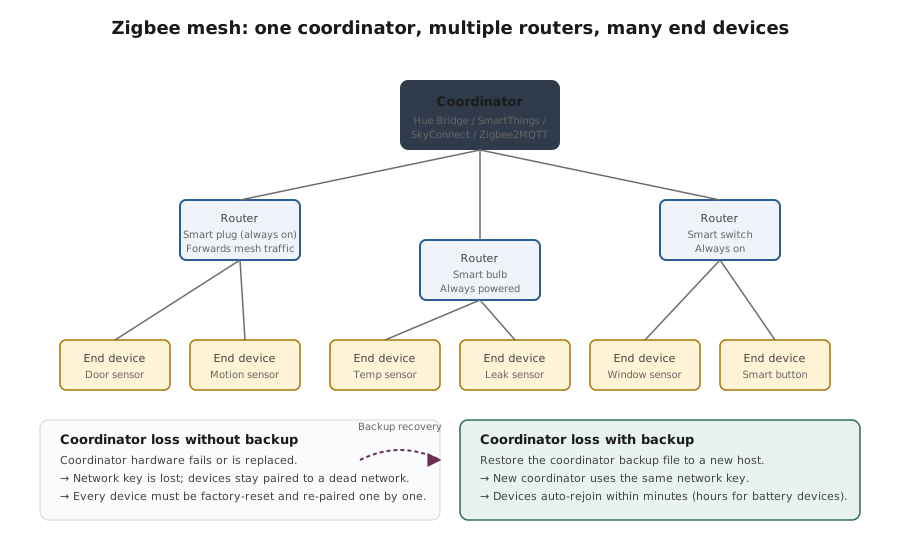
Zigbee mesh topology + recovery model
Reference images and diagrams. Click any image to view full resolution.
Problem summary
Every Zigbee network has exactly one coordinator — the device that owns the network credentials, network key, and the routing table. When the coordinator goes offline or is replaced, every Zigbee device disconnects until the coordinator returns or a backup is restored to a new coordinator. The recovery options depend on whether you have a coordinator backup and which platform manages it.
Coordinator hardware is powered and reachable.
Frontend > Settings > Coordinator. Verify connected, firmware version, channel, network address.
Bridge status LED on; USB stick host (Home Assistant) running; coordinator UI reachable.
Stop before factory-resetting devices that are battery-powered with hard-to-access reset buttons (in-wall sensors).
Layer path
Step-by-step runbook
Start here. Do each check in order, compare it to the expected result, and stop when the evidence explains the failure or the safe stop point applies.
Verify coordinator is online and reachable
Check: Bridge LED on; USB stick host (HA) running; coordinator UI loads.
Expected result: Coordinator hardware is fine.
If not: If not, power-cycle; if still dead, vendor support OR replacement coordinator + restore.
Check coordinator UI for device list state
Check: Hue app / SmartThings app / Home Assistant ZHA or Zigbee2MQTT frontend.
Expected result: Devices listed (even if 'unavailable') OR empty.
If not: Devices listed but unavailable → network heal (step 4). Empty → restore backup OR re-pair (step 3).
Restore from backup if coordinator state is lost AND backup exists
Check: Copy the backup files to the new coordinator install; restart the integration.
Expected result: Devices reappear in the coordinator UI.
If not: If no backup exists, factory-reset every device and re-pair — no shortcut.
Trigger network heal if devices are listed but unavailable
Check: Reconfigure Device on powered router devices; wait 24h for battery devices to check in.
Expected result: Mesh re-establishes; devices return to available state.
If not: Some battery devices check in only every few hours — patience.
If channel change broke the mesh, wait or change Wi-Fi
Check: Identify Zigbee channel; verify Wi-Fi 2.4 GHz channels are 1/6/11; let mesh heal.
Expected result: Wi-Fi and Zigbee on non-conflicting channels.
If not: Don't change Zigbee channel back arbitrarily — the change forces all devices to re-discover.
Take a coordinator backup now if you didn't have one
Check: Zigbee2MQTT > Settings > Backup. HA: enable automatic backups including the Zigbee integration.
Expected result: Backup exists outside the coordinator host.
If not: Future coordinator loss recoverable in minutes instead of days of re-pairing.
Did this solve your problem?
Your answer helps us improve this page.
No account or personal details. We store the page, answer, optional reason and day with a 90-day retention period. A random reference in this browser prevents repeat votes. Feedback privacy
Decision tree
If: Coordinator UI shows the device list intact but devices 'unavailable'.
Then: Mesh issue, not coordinator data loss.
Action: Network heal: Hue app > Search for new lights; Home Assistant ZHA: Reconfigure Device on router devices. Wait 24h for battery-powered devices to check in.
If: Coordinator UI is empty / 'no devices found' AND a backup exists.
Then: Restore from backup.
Action: Home Assistant ZHA: copy `/config/zigbee.db` to the new install. Zigbee2MQTT: copy `coordinator_backup.json` and `database.db`. Restart the integration.
If: Coordinator UI is empty AND no backup exists.
Then: Re-pair every device — no shortcut.
Action: Factory-reset each Zigbee device (manufacturer-specific procedure). Add to coordinator. Group by room to make the work less painful.
Safe stop: Stop before factory-resetting devices that are battery-powered with hard-to-access reset buttons (in-wall sensors).
If: Moving Home Assistant to a new server and want to keep the Zigbee network.
Then: Copy the full Zigbee state + USB stick BEFORE starting the new install.
Action: ZHA: copy /config/zigbee.db. Zigbee2MQTT: copy /config/zigbee2mqtt/ directory. Move USB stick to new host. Start integration. Network is preserved.
If: Hue Bridge dead, new bridge needed.
Then: Hue migration tool if old bridge partially works; otherwise factory-reset every light.
Action: Hue app > settings > Hue Bridges > Migrate from old Bridge. If dead: factory-reset lights (turn off/on 5x in 8 seconds for most Hue lights) and re-pair to new bridge.
If: Suspected channel collision with Wi-Fi.
Then: Wi-Fi on Zigbee channel range causing instability.
Action: Wi-Fi: channels 1, 6, or 11 only (these don't overlap with each other). Zigbee: default 11 or 15. Avoid configurations where Wi-Fi channel sits between Zigbee channels.
Evidence table
| Symptom | Evidence to collect | Likely layer | Next action |
|---|---|---|---|
| Hue app shows all lights 'unreachable' simultaneously. | Hue app status indicator on every light. | Coordinator unreachable | Power-cycle the Hue Bridge; if still unreachable, check Hue Bridge status LED — vendor support if dead. |
| Home Assistant ZHA shows devices 'unavailable' (yellow/red status) but coordinator is healthy. | Settings > Devices & Services > ZHA > devices list. | Mesh routing broken | Reconfigure Device on router devices (powered Zigbee devices); wait 24h for battery devices to check in. |
| Zigbee2MQTT frontend shows coordinator firmware version is much older than the latest stable. | Frontend > Settings > About > coordinator firmware. | Outdated coordinator firmware (potential instability) | Flash the latest stable coordinator firmware via the documented procedure for that USB stick model (zigbee2mqtt.io guide). |
| After Home Assistant reinstall, Zigbee2MQTT shows 'no devices'. | Frontend > devices tab is empty. | Coordinator state lost (backup not restored) | Stop. Restore `coordinator_backup.json` + `database.db` BEFORE re-pairing any device; otherwise you create a new network and lose ability to recover the old one. |
Commands and settings paths
Check coordinator status (Home Assistant Zigbee2MQTT)
Frontend > Settings > Coordinator. Verify connected, firmware version, channel, network address.Where: In the Zigbee2MQTT web frontend (typically port 8080).
Expected: Coordinator shows Connected; firmware version current; channel matches expected (default 11).
Failure means: If Disconnected, USB stick or host issue.
Safe next step: Check USB stick is plugged in firmly; check host (Home Assistant) is running.
Take coordinator backup (Zigbee2MQTT)
Frontend > Settings > Backup > Download backup. Stores `coordinator_backup.json` + database.Where: In the Zigbee2MQTT web frontend.
Expected: Backup file downloaded; size > 0 bytes.
Failure means: Without periodic backups, coordinator loss = re-pair everything.
Safe next step: Schedule automatic backups via Home Assistant automation.
Restore coordinator backup (Zigbee2MQTT)
Stop Zigbee2MQTT add-on. Copy `coordinator_backup.json` and `database.db` to `/config/zigbee2mqtt/` on the new host. Move USB stick to new host. Start Zigbee2MQTT.Where: On the new Home Assistant host.
Expected: Devices appear in the Zigbee2MQTT frontend; states reflect the backup snapshot.
Failure means: If devices don't appear, network key mismatch — verify coordinator is reading the correct backup files.
Safe next step: Wait 24h after restore for battery-powered devices to check in.
Trigger network heal (Home Assistant ZHA)
Settings > Devices & Services > ZHA > Configure > Reconfigure Device on powered router devices.Where: In Home Assistant.
Expected: Devices re-establish mesh routing; previously-unavailable battery devices reconnect.
Failure means: Battery devices check in on their own schedules (hours-to-days).
Safe next step: Patience helps — don't force-reset devices that just haven't woken up yet.
Hardware and platform boundary
Change only when
- Migrating to Zigbee2MQTT from a closed bridge (Hue, SmartThings) is the right next step only when you understand the migration cost (factory-reset every device) — the open coordinator has better backup/restore but the transition is painful.
Evidence that matters
- Coordinator backup cadence, channel selection (avoid Wi-Fi overlap), and powered-router-device placement for mesh health matter most.
Evidence that does not matter
- Newer coordinator hardware (Sonoff Zigbee Dongle Plus, SkyConnect) doesn't change recovery patterns; what matters is whether you have backups.
Avoid
- Avoid moving the coordinator USB stick between hosts without backing up state, factory-resetting devices speculatively, or running multiple coordinators on the same channel.
Related tool/checklist
Use the linked tool when you need a guided plan from your exact symptoms instead of a static checklist.
Device setup troubleshooterRelated problems
Last reviewed
2026-05-18 · Reviewed by HomeTechOps. Reviewed against the Connectivity Standards Alliance's Zigbee documentation and Zigbee2MQTT's adapter/coordinator documentation; specifically the coordinator-owned-network-state model, the backup-and-restore migration flow, and the channel-collision interaction with Wi-Fi.
Sources/assumptions
- Assumes a Zigbee 3.0 network (the current standard); older Zigbee Pro / Zigbee Light Link networks have additional migration constraints.
- Assumes the coordinator platform supports backups; some legacy bridges (very old Hue Bridge v1) don't have a documented backup/restore flow.
Source-backed checks
HomeTechOps turns official docs and conservative safety rules into a shorter runbook. These links are the source trail for the page direction.
Get the deal & firmware alerts
Home Stack Field Notes: NAS deals, firmware changes worth acting on, restore-test reminders, and new decision guides — plus the capacity & backup sizing cheatsheets from our calculators. Unsubscribe anytime.
Subscribe on beehiiv