
Self-Hosting
Tailscale vs Cloudflare Tunnel for home remote access
Tailscale and Cloudflare Tunnel solve different problems even though both let you reach your home from outside without opening router ports. Tailscale is a mesh VPN — every device that needs to reach your home installs a client, and you get full LAN access with WireGuard-direct peer-to-peer connections. Cloudflare Tunnel is a reverse tunnel — your home server runs a `cloudflared` daemon that maintains an outbound connection to Cloudflare's edge, and your services become public HTTPS URLs that anyone with the link can reach. Most operators end up needing both: Tailscale for admin/SSH/SMB, Cloudflare Tunnel for anything you want a non-technical visitor to reach via a normal web link.
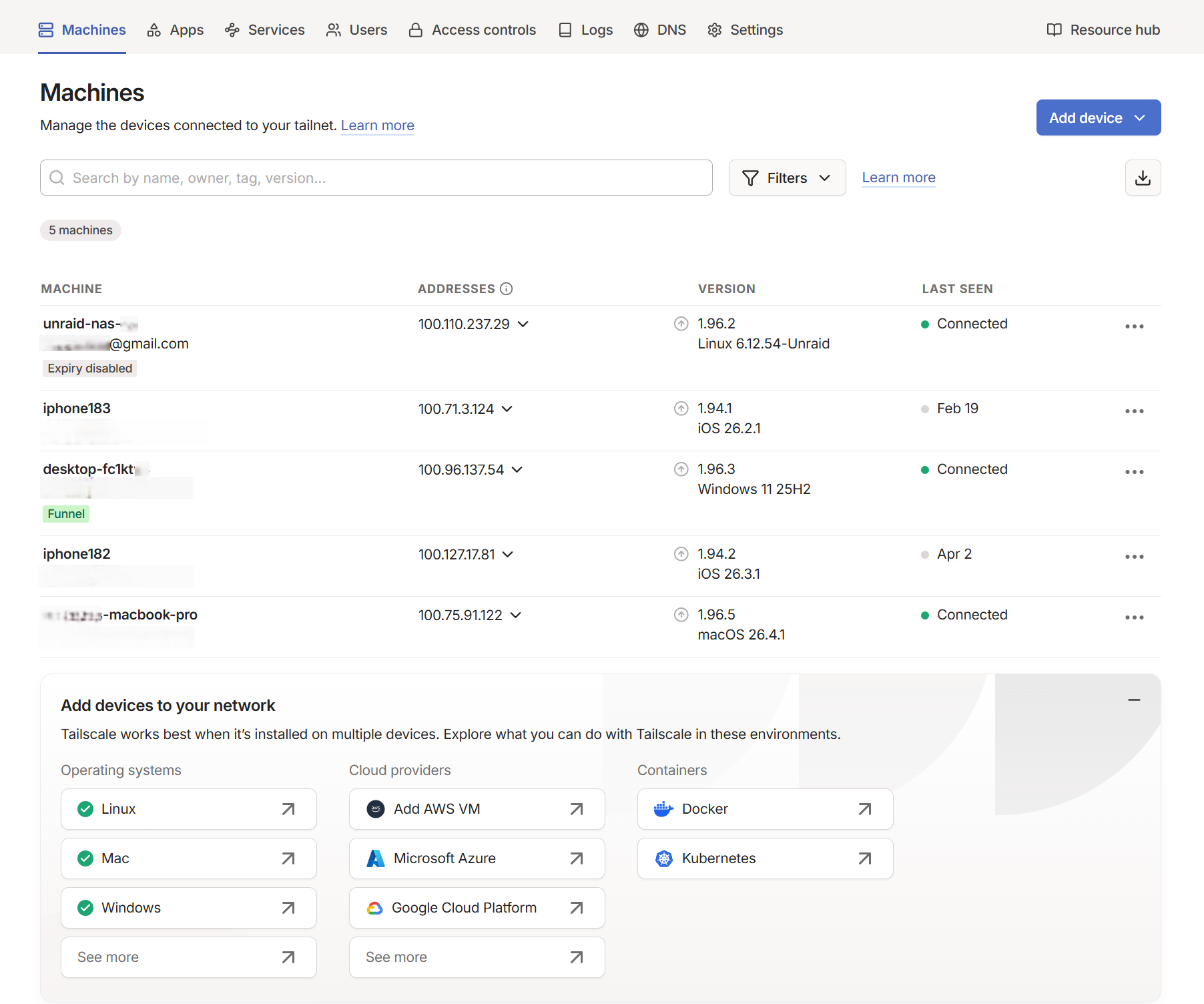
What a real Tailscale tailnet looks like in the admin console
Reference images and diagrams. Click any image to view full resolution.
Who this is for
Home operators running services on a NAS (Synology / Unraid / TrueNAS Scale / QNAP) who need to reach them from outside — admin SSH, Home Assistant, Plex, SMB file shares, public dashboards, or family-shareable links. Choosing between Tailscale (mesh VPN), Cloudflare Tunnel (reverse proxy to CF edge), or both.
Outcome
A working remote-access setup using one or both tools, with the right tool serving the right service: Tailscale for admin/SSH/SMB/streaming, Cloudflare Tunnel for public-shareable web links. Failure modes catalogued and known by the operator before they hit them.
Required inputs
- A NAS (or other always-on home server) that can install Tailscale and/or Cloudflared.
- A free Tailscale account (tailscale.com) and/or a free Cloudflare account with a domain managed on Cloudflare DNS.
- Outbound internet from the home (both tools work behind CGNAT — see /fix/cgnat-home-access-no-public-ip if unsure).
- Decision on what services need public access vs admin-only access.
Step-by-step procedure
Decide which tool fits each service before installing anything
Do: List every service you need remote access to. For each: is it admin-only (you only), small group (you + family with clients), or public-shareable (anyone with the link)? Admin-only → Tailscale. Public-shareable → Cloudflare Tunnel. Family group → either: Cloudflare Access is free up to 50 users, while Tailscale's free Personal plan (Pricing v4, April 2026) covers 6 users with unlimited user-owned devices and 50 tagged resources.
Expected result: A list with service name → recommended tool annotation.
If not: If you're unsure, default to Tailscale for the first install — it's easier to add Cloudflare Tunnel later than to un-share a public Cloudflare hostname after the URL is out. If you'd rather not depend on a hosted control plane at all, the self-hosted equivalents are Headscale (a Tailscale control server) and Pangolin (a Cloudflare-Tunnel-style reverse proxy on your own VPS) — more setup, full sovereignty.
Install Tailscale on the NAS
Do: Synology: Package Center > Tailscale > Install + the boot-time `configure-host` Task Scheduler script. Unraid: Apps > Tailscale plugin > Settings > authenticate. TrueNAS Scale: Apps > Discover Apps > Tailscale > Install + paste auth key.
Expected result: `tailscale status` shows the NAS connected with a Tailscale IP in 100.x.y.z range. Other Tailscale clients can ping that IP.
If not: On Synology, the most common issue is the boot-time configure-host script not surviving a package update — re-run it from Task Scheduler if `tailscale status` shows degraded connectivity after an upgrade. Synology doesn't auto-update Tailscale, so schedule `tailscale update --yes`. (The April 2026 WireGuard-for-Windows signing freeze did NOT affect Tailscale — it ships its own userspace WireGuard and is independently signed.)
Install Tailscale on every device that needs admin access
Do: Phone (iOS / Android app), laptop (Windows / macOS / Linux client), work computer. Sign in with the same account. Confirm each device appears in the admin console at login.tailscale.com.
Expected result: Tailnet shows all devices. SSH to NAS by Tailscale IP works from a phone on cellular.
If not: If devices show but can't reach each other, check ACLs in the admin console — the default policy allows full mesh but a custom ACL may have locked it down.
Tighten the Tailscale ACL before sharing with anyone else
Do: Admin console > Access Controls > edit the ACL JSON. Add tags for device groups (`tag:nas`, `tag:admin`), define users, restrict who can reach what. The default 'autogroup:member' allows full mesh — replace with least-privilege rules before adding family/external users.
Expected result: Family members added (via email invite) can only reach the services you specified, not the full LAN.
If not: Skip this only if you're the sole user and accept that any compromised device on your tailnet reaches everything.
Install Cloudflared on the NAS for public-shareable services
Do: Cloudflare Zero Trust dashboard > Networks > Tunnels > Create tunnel > Cloudflared. Choose Docker. Copy the docker run command (contains the tunnel token). Run on the NAS via Container Manager (Synology) / Community Apps (Unraid) / Apps catalog (TrueNAS Scale).
Expected result: Cloudflare Zero Trust dashboard shows the tunnel as 'Connected'. cloudflared logs show outbound TLS to CF edge.
If not: If tunnel won't connect, check outbound 443 isn't blocked by an upstream firewall — cloudflared has no listening port, only outbound TLS.
Create public hostnames in the Cloudflare Tunnel — with Access policies
Do: CF dashboard > tunnel > Public Hostname > add subdomain → service URL (e.g. `https://nas.local:5001` with noTLSVerify if self-signed). For each hostname, attach a Cloudflare Access policy (email allow-list, Google/GitHub SSO, OTP) before going live — without one, the subdomain is publicly reachable.
Expected result: `https://service.example.com` loads from a cellular connection; Access policy challenges unauthenticated visitors.
If not: If the subdomain returns 502 from CF edge, the tunnel is reaching CF but cloudflared can't reach the local service — verify the service is listening on the URL specified in the hostname config.
Test failure modes you'll hit later (so you know what to do)
Do: Test Nextcloud / Immich large-file upload through Cloudflare Tunnel — confirm the 100 MB cap is the bottleneck. Test SMB through Cloudflare Tunnel — confirm it doesn't work cleanly. Test Plex remote streaming through Cloudflare Tunnel — note quality/latency.
Expected result: Files over 100 MB fail through Cloudflare Tunnel (proxied HTTP path), and SMB is unreliable. These are expected. They're why you also installed Tailscale.
If not: If Cloudflare Tunnel handles large uploads fine, you're either on Business+ tier or your specific upload path bypasses the proxy — verify with the actual file sync you'll run in production.
Handle DNS, MTU, and key-expiry before you depend on it
Do: If you run Pi-hole, set its tailnet IP as the global nameserver with 'Override local DNS' so ad-blocking doesn't leak. On any subnet router or exit node, apply MSS clamping (or set MTU ~1280) so large packets don't black-hole. In the admin console, disable key expiry on always-on servers (NAS, Home Assistant) so they don't silently drop off the tailnet.
Expected result: DNS resolves through Pi-hole over the tailnet; no 'some HTTPS sites hang' symptom; the NAS stays connected indefinitely without re-auth.
If not: If some sites hang while others load, it's a PMTU black hole — clamp MSS on the router. If the NAS drops off after months, its node key expired — disable expiry for that machine.
Commands and settings paths
Verify Tailscale connectivity from the NAS
tailscale status
Where: SSH to NAS (or DSM Task Scheduler one-shot script).
Expected: All tailnet peers listed with relay status (`direct` is best; `relay` via DERP is acceptable but adds latency).
Failure means: If status shows the NAS as 'logged out', the tailscaled service isn't running.
Safe next step: Restart: `sudo systemctl restart tailscaled` (Linux) or via Tailscale package UI (DSM).
Verify Cloudflare Tunnel connection state
cloudflared tunnel info <tunnel-name>
Where: On a workstation with cloudflared CLI + auth, or in the Cloudflare Zero Trust dashboard > Networks > Tunnels.
Expected: Tunnel shows 'Connected' with at least one active connector. Dashboard shows recent requests if the hostname has been visited.
Failure means: Tunnel disconnected = cloudflared isn't reaching CF edge — usually outbound 443 blocked or the token is invalid.
Safe next step: Restart the cloudflared container; check container logs for auth errors; regenerate the tunnel token from CF dashboard if needed.
Check whether a Tailscale path is direct or relayed
tailscale ping <peer-host>
Where: From any tailnet client (the NAS, a laptop, or the phone app's ping).
Expected: 'pong ... via DIRECT' is best; 'via DERP' means relayed — works, but adds latency.
Failure means: If every peer is relayed, UDP NAT-traversal is blocked somewhere (strict firewall or symmetric NAT).
Safe next step: Run `tailscale netcheck`; allow outbound UDP 41641; relay via DERP still works as a fallback.
Confirm you're behind CGNAT (why these tools are needed)
Compare the router's WAN IP (admin UI) to `curl https://ifconfig.me`
Where: Router admin UI + any LAN client with curl.
Expected: If the WAN IP differs from your public IP, or is in 100.64.0.0/10, you're behind CGNAT — port-forwarding won't work but Tailscale/Cloudflare Tunnel will.
Failure means: If they match and it's a public IP, you could port-forward — but these outbound-only tools are still safer.
Safe next step: See /fix/cgnat-home-access-no-public-ip for the full CGNAT confirmation and options.
Diagnose NAT traversal when peers won't connect directly
tailscale netcheck
Where: On the NAS or any client.
Expected: Reports whether UDP works, the nearest DERP region, and whether a global v4/v6 address was found.
Failure means: 'UDP: false' means UDP is blocked, so everything relays via DERP (slower).
Safe next step: Open outbound UDP (41641) on the upstream firewall; behind CGNAT this is expected and DERP relay is the fallback.
Evidence to record
- Tailscale admin console screenshot showing all your devices listed with tags + ACL state.
- Cloudflare Zero Trust dashboard screenshot showing tunnel status: Connected + list of public hostnames with Access policies.
- Test result log: from cellular, can SSH to NAS via Tailscale IP; from cellular, can hit public hostname via Cloudflare Tunnel.
- Capture of the failure modes for your reference: 100 MB upload limit hit, SMB-over-Tunnel attempt.
Common mistakes
- Assuming the Tailscale free plan is still '3 users / 100 devices' — as of Pricing v4 (April 2026) it's 6 users, unlimited user-owned devices, and 50 tagged resources. Stale guides and aggregators still quote the old numbers.
- Trying to push large uploads (>100 MB) through an orange-clouded Cloudflare hostname — you hit HTTP 413. Use a sync client that chunks (Nextcloud desktop/mobile), or a separate grey-cloud (DNS-only) upload host.
- Routing personal video streaming (Plex/Jellyfin) through Cloudflare Tunnel — the CDN restriction on non-Cloudflare-hosted video moved out of §2.8 into the CDN Service-Specific Terms but still applies; operators report account warnings. Stream over Tailscale.
- Exposing SMB (445), SSH (22), or RDP on a public Cloudflare hostname instead of keeping admin protocols on the private Tailscale mesh — public SMB is a top ransomware vector.
- Synology: not adding the boot-up Task Scheduler script, so Tailscale dies after a reboot or package update — and assuming Synology auto-updates Tailscale (it doesn't; schedule `tailscale update --yes`).
- Confusing the April 2026 WireGuard-for-Windows code-signing freeze with Tailscale — Tailscale ships its own userspace WireGuard and is independently code-signed, so it was unaffected. Don't abandon it in a panic.
- MagicDNS + Pi-hole misconfigured — not setting Pi-hole's tailnet IP as the global nameserver with 'Override local DNS,' so ad-blocking silently leaks; or expecting Pi-hole Conditional Forwarding to do client-based split DNS (it doesn't).
- Ignoring MTU/MSS on subnet routers and exit nodes — the signature is 'some HTTPS sites hang while others load' (a PMTU black hole). Fix with MSS clamping on the router or an MTU near 1280.
- Advertising a subnet route or exit node but forgetting to approve it in the admin console — peers then can't reach the LAN even though the NAS thinks it's routing.
- Letting Tailscale node keys expire on always-on servers (NAS, Home Assistant) — the device silently drops off the tailnet. Disable key expiry for them in the admin console.
- Forgetting to attach a Cloudflare Access policy to a public hostname — the subdomain is then reachable to anyone who finds it (Certificate Transparency logs make subdomains discoverable).
- Leaving the default Tailscale full-mesh ACL in place after adding family/external users — they can reach every device, not just the ones you intend.
Stop points
- Stop before exposing any home service via Cloudflare Tunnel without attaching an Access policy — even 'just a status page' becomes a public attack surface without authentication.
- Stop before granting Tailscale tailnet access to a family member without first writing the ACL to limit what they can reach — the default policy is full mesh.
- Stop before routing Plex/Jellyfin streaming through Cloudflare Tunnel — it violates the CDN Service-Specific Terms (non-Cloudflare-hosted video) and risks account suspension. Stream over Tailscale instead.
- Stop before treating Cloudflare Tunnel as a 'VPN' — it's a public HTTP reverse tunnel; without an Access policy in front, the app's own login page faces the whole internet.
- Stop before relying on Tailscale Funnel for bandwidth-heavy public exposure on the free tier — it's relay-limited and may be rate-limited; for a real public site use Cloudflare Tunnel.
Last reviewed
2026-05-18
Source-backed checks
HomeTechOps turns official docs and conservative safety rules into a shorter runbook. These links are the source trail for the page direction.
Did this help you choose?
Your answer helps us improve this page.
No account or personal details. We store the page, answer, optional reason and day with a 90-day retention period. A random reference in this browser prevents repeat votes. Feedback privacy
Get the deal & firmware alerts
Home Stack Field Notes: NAS deals, firmware changes worth acting on, restore-test reminders, and new decision guides — plus the capacity & backup sizing cheatsheets from our calculators. Unsubscribe anytime.
Subscribe on beehiiv