
Mac
A 3-2-1 backup plan for your Mac
How to build a real 3-2-1 backup for a Mac — three copies, two media, one offsite — using Time Machine, a NAS, and cloud, and where iCloud fits (and doesn't).
Start here: Local copy
Time Machine to a local external drive.
Problem summary
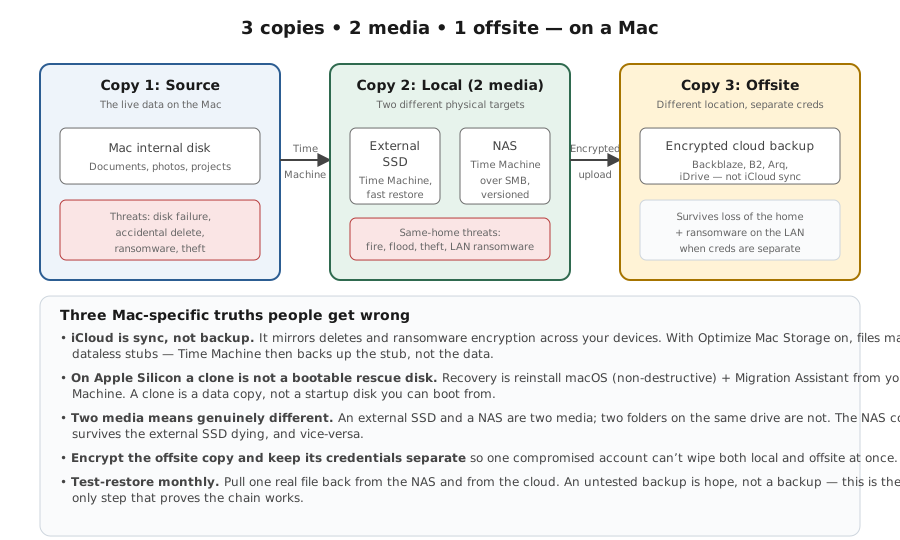
I'm here because I want a backup plan that would actually save me — not just Time Machine and a vague hope. The standard that works is 3-2-1: three copies of your data, on two different kinds of media, with one kept offsite. This page maps 3-2-1 onto a real Mac setup (Time Machine, a NAS, and a cloud backup), corrects two common mistakes — thinking a bootable clone is still your rescue disk, and treating iCloud as a backup — and ends with the step everyone skips: testing a restore.
Count your copies against failure modes.
System Settings → General → Time Machine → Add Backup Disk
Three copies covering mistake / drive-death / location-disaster.
Treating iCloud sync as a backup.
Layer path
Step-by-step runbook
Start here. Do each check in order, compare it to the expected result, and stop when the evidence explains the failure or the safe stop point applies.
Local copy
Check: Time Machine to a local external drive.
Expected result: Fast, versioned, everyday restores.
If not: If no room for a drive, lean on the NAS copy.
Second medium
Check: Time Machine to a NAS over SMB (multiple destinations).
Expected result: A second versioned copy on different media.
If not: If the NAS target is flaky on Tahoe, see the TM-to-NAS page.
Offsite copy
Check: Continuous cloud backup (or a rotated offsite drive).
Expected result: Survives fire/theft/flood/ransomware at home.
If not: If cloud isn't feasible, rotate a drive to another location.
Fix the misconceptions
Check: Treat clones as data backups and iCloud as sync, not backup.
Expected result: Recovery is reinstall + Migration Assistant; real history is TM + cloud.
If not: Don't count iCloud/clone as a backup tier.
Test restores
Check: Restore a file from each copy; rehearse the recovery path once.
Expected result: Every copy is proven to actually restore.
If not: Replace any copy that fails a test.
Did this solve your problem?
Your answer helps us improve this page.
No account or personal details. We store the page, answer, optional reason and day with a 90-day retention period. A random reference in this browser prevents repeat votes. Feedback privacy
Decision tree
If: You have only Time Machine (one copy).
Then: Single point of failure — a dead drive loses everything.
Action: Add a NAS copy (different medium) and a cloud copy (offsite).
If: You rely on iCloud as your backup.
Then: iCloud is sync — deletions propagate, placeholders aren't history.
Action: Add real versioned backups (Time Machine + cloud); keep iCloud as convenience.
If: You're keeping a bootable clone as your rescue disk.
Then: Clones don't reliably boot Apple Silicon.
Action: Plan recovery as Recovery → reinstall → Migration Assistant; treat the clone as a data copy.
If: All copies live in the same room.
Then: One physical disaster takes them all.
Action: Make one copy offsite (cloud, or a drive stored elsewhere).
If: You've never tested a restore.
Then: Unknown whether any copy actually restores.
Action: Test-restore from each copy and schedule periodic re-tests.
Evidence table
| Symptom | Evidence to collect | Likely layer | Next action |
|---|---|---|---|
| Only one backup exists. | Just Time Machine, or just iCloud. | Single point of failure. | Add a second medium + offsite copy. |
| Deleted file is gone everywhere. | Relying on iCloud sync as 'backup'. | Sync, not versioned backup. | Add Time Machine + cloud backup with history. |
| Plan assumes booting a clone to recover. | Apple Silicon Mac; external clone. | Clone won't boot reliably. | Recovery → reinstall → Migration Assistant. |
| Every copy is in the same room. | No offsite copy. | Location-disaster exposure. | Add cloud or an offsite rotated drive. |
| Backup turns out unreadable when needed. | Never test-restored. | Silent backup failure. | Test restores periodically. |
Commands and settings paths
Add a second Time Machine destination
System Settings → General → Time Machine → Add Backup DiskWhere: Settings on the Mac (local drive + NAS).
Expected: Time Machine alternates between destinations, giving two versioned copies.
Failure means: If one destination misbehaves, the other still holds history.
Safe next step: Keep both; don't let a flaky one be your only copy.
Check Time Machine destinations and status
tmutil destinationinfo ; tmutil statusWhere: Terminal on the Mac.
Expected: Lists configured destinations and shows whether a backup is current.
Failure means: A missing destination or stale 'last backup' means a copy isn't running.
Safe next step: Re-add the destination or fix the drive/NAS.
Verify a restore actually works
Enter Time Machine and restore one file (or restore from the cloud client)Where: Time Machine UI / cloud backup app on the Mac.
Expected: The restored file opens and matches — the copy is proven real.
Failure means: If restore fails, that copy is not trustworthy.
Safe next step: Fix or replace it before relying on it.
Hardware and platform boundary
Change only when
- Add a cloud backup the moment your only copies are all at home — it's the offsite leg of 3-2-1.
- Add a NAS as a second Time Machine destination so two versioned copies happen automatically.
Evidence that matters
- At least three copies, on two media, with one offsite.
- Versioning + client-side encryption on the cloud copy (ransomware resilience).
- A tested recovery path (reinstall + Migration Assistant), not a clone.
Evidence that does not matter
- Backup app brand wars — the 3-2-1 structure matters more than the tool.
- Clone 'bootability' on Apple Silicon — it's not the rescue path anymore.
- iCloud storage tier as 'backup size' — iCloud isn't the backup.
Avoid
- Treating iCloud sync as a backup.
- Relying on a bootable clone to rescue an Apple Silicon Mac.
- Keeping every copy in one location, or never testing a restore.
The 3-2-1 plan mapped to a Mac
Reference images and diagrams. Click any image to view full resolution.
Related tool/checklist
Use the linked tool when you need a guided plan from your exact symptoms instead of a static checklist.
Backup plan builderRelated problems
Last reviewed
2026-06-02 · Reviewed by HomeTechOps. Reviewed against Apple's Time Machine backup/restore documentation and Bombich's bootable-backup-deprecation guidance; maps 3-2-1 onto Time Machine local + NAS + cloud, corrects the clone-as-rescue-disk and iCloud-as-backup misconceptions for Apple Silicon, and makes the test restore the step that turns a plan into protection.
Sources/assumptions
- Assumes a Mac (including macOS Tahoe / macOS 26, Apple Silicon) where the supported recovery path is Recovery → reinstall → Migration Assistant rather than booting a clone.
- Specific products (Backblaze, Arq, CCC, SuperDuper) are examples of categories; the 3-2-1 principle is product-agnostic.
- Time Machine multiple-destination behaviour and iCloud sync semantics follow Apple's documentation.
Source-backed checks
HomeTechOps turns official docs and conservative safety rules into a shorter runbook. These links are the source trail for the page direction.
Get the deal & firmware alerts
Home Stack Field Notes: NAS deals, firmware changes worth acting on, restore-test reminders, and new decision guides — plus the capacity & backup sizing cheatsheets from our calculators. Unsubscribe anytime.
Subscribe on beehiiv