
Mac
Mac mini keeps going to sleep as a home server
Stop a Mac mini sleeping when you run it 24/7 as a Plex, Jellyfin, or file server on macOS Tahoe — the Energy setting most miss, plus pmset and caffeinate.
Start here: Set the headless Energy toggle
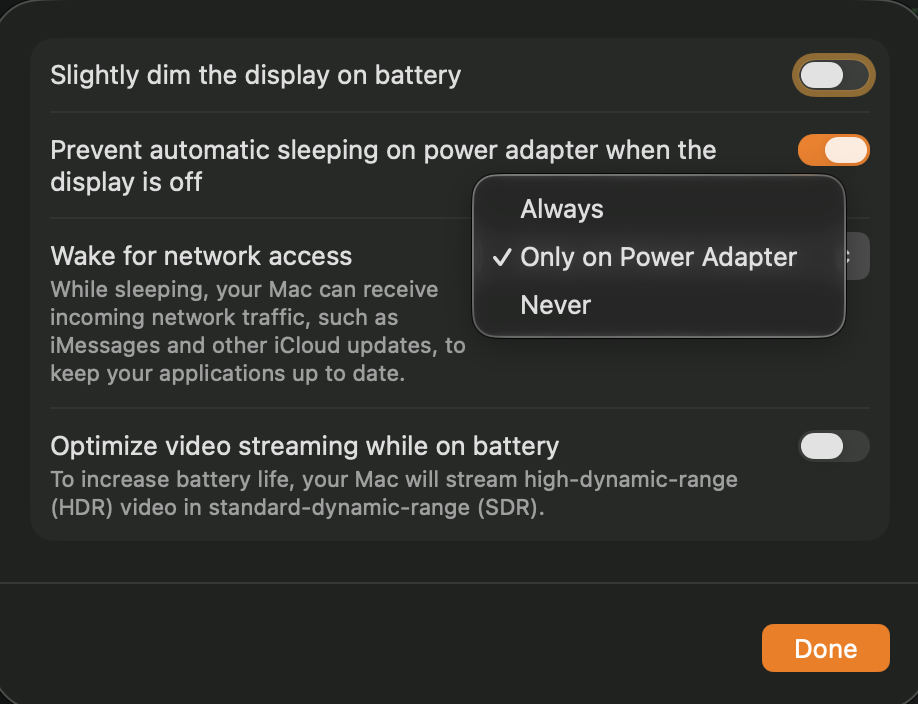
Turn on System Settings → Energy → 'Prevent automatic sleeping when the display is off'.
Problem summary
I'm here because my Mac mini keeps going to sleep when I'm using it as an always-on server — Plex or Jellyfin streams stop, my shared folders disappear, or I can't reach it remotely until I physically wake it. The fix is almost always one Energy setting that headless Macs need but rarely have on, backed up by the `pmset` power policy and `caffeinate`. This page sets it up the right way, including the M4 Mac mini quirk where `caffeinate` looks like it's working but the machine sleeps anyway.
Check System Settings → Energy for "Prevent automatic sleeping when the display is off".
pmset -g assertions
It is ON — the headless server setting most people miss is in place.
Don't disable FileVault on a Mac holding sensitive data without weighing the loss of encryption.
Layer path
Step-by-step runbook
Start here. Do each check in order, compare it to the expected result, and stop when the evidence explains the failure or the safe stop point applies.
Set the headless Energy toggle
Check: Turn on System Settings → Energy → 'Prevent automatic sleeping when the display is off'.
Expected result: A monitorless Mac mini no longer idles to sleep.
If not: If there's no such toggle, you're on a laptop — use a Mac mini for an always-on server.
Read the current power state
Check: Run `the "See what's holding sleep off" command below` and `pmset -g`.
Expected result: You can see what's holding sleep off and the current sleep value.
If not: If nothing holds it and sleep is non-zero, you have no never-sleep policy yet.
Apply a never-sleep policy
Check: Run `sudo pmset -a sleep 0` (add `disablesleep 1` if it still sleeps).
Expected result: `pmset -g` confirms sleep 0; the server stays awake.
If not: If it still sleeps, check the pmset log for the wake/sleep trigger.
Give server apps a session
Check: Enable auto-login and keep media servers native (not containerized).
Expected result: Plex/Jellyfin keep their GUI session and the Apple media engine for transcoding across reboots.
If not: If you can't use auto-login because of FileVault, decide the encryption trade-off deliberately.
Safe stop: Don't disable FileVault on a Mac holding sensitive data without weighing the loss of encryption.
Choose never-sleep over wake-on-LAN
Check: Leave the server never-sleeping rather than relying on Apple Silicon wake-on-LAN.
Expected result: The server is always reachable; you skip the flaky wake path.
If not: If you must sleep to save power, test wake-on-LAN thoroughly before depending on it.
Verify under real idle
Check: Leave the mini idle, then confirm Plex/SMB/Tailscale stay reachable and check `pmset -g log`.
Expected result: Nothing drops during idle and the log shows no unwanted sleeps.
If not: If it still sleeps, find the trigger in the log before forcing more settings.
Did this solve your problem?
Your answer helps us improve this page.
No account or personal details. We store the page, answer, optional reason and day with a 90-day retention period. A random reference in this browser prevents repeat votes. Feedback privacy
Decision tree
If: Energy → 'prevent sleeping when display off' is off on a headless Mac mini.
Then: The mini sleeps on the default idle timer despite running services.
Action: Turn the setting on; re-test by leaving it idle and checking reachability.
If: Setting is on but it still sleeps, and `pmset -g` shows a non-zero sleep value.
Then: No explicit never-sleep policy.
Action: Apply `sudo pmset -a sleep 0` (and `disablesleep 1` if needed).
If: caffeinate is running and shows in assertions, but the M4 mini still sleeps.
Then: The known M4 behavior where caffeinate holds an assertion but doesn't actually prevent sleep.
Action: Rely on the Energy setting + pmset instead; treat caffeinate as a supplement, not the fix.
Safe stop: Don't ship a server whose only sleep-prevention is caffeinate on an M4 mini.
If: Only Plex/Jellyfin streams drop, while SSH/SMB stay up.
Then: App-level: the server app lost its session or hardware transcoding path, not host sleep.
Action: Keep the media server native (not containerized) and enable auto-login so it has a GUI session.
If: The mini sleeps fine but won't wake reliably for network access.
Then: Apple Silicon wake-on-LAN is flaky.
Action: Switch the design to never-sleep rather than depending on wake-on-LAN.
Evidence table
| Symptom | Evidence to collect | Likely layer | Next action |
|---|---|---|---|
| Headless Mac mini sleeps and all remote access drops together. | Energy 'prevent sleep when display off' is off; `pmset -g` sleep is non-zero. | Energy / pmset power policy. | Enable the Energy setting and set `pmset -a sleep 0`. |
| caffeinate is running but the M4 mini still sleeps. | `pmset -g assertions` shows the assertion held, yet sleep still occurs. | Apple Silicon caffeinate quirk. | Use the Energy setting as the primary fix; verify the machine truly stays awake. |
| Plex streams stop on idle but SSH still works. | Host is awake (SSH responds); only the media app dropped. | Server app / login session, not host sleep. | Keep Plex native + enable auto-login; check Plex is set to allow hardware transcoding. |
| Mac mini doesn't come back after a power cut. | Energy auto-power-on is off, or auto-login is blocked by FileVault. | Power-on / auto-login policy. | Enable the Tahoe 26.5 auto-power-on, weigh the FileVault-vs-auto-login trade-off, add a UPS. |
Commands and settings paths
See what's holding sleep off
pmset -g assertionsWhere: Terminal on the Mac mini, while the server should be active.
Expected: Lists PreventUserIdleSystemSleep assertions and which process holds each.
Failure means: No relevant assertion means nothing is currently preventing idle sleep.
Safe next step: Enable the Energy setting or set an explicit pmset policy.
Read and set the sleep policy
pmset -g ; sudo pmset -a sleep 0Where: Terminal on the Mac mini (the set command needs sudo).
Expected: `pmset -g` shows sleep 0 after the change — the system won't idle-sleep.
Failure means: If it still sleeps, the configuration also needs `sudo pmset -a disablesleep 1`.
Safe next step: Apply disablesleep, then re-test an idle period.
Keep the Mac awake for one process
caffeinate -i <command>Where: Terminal on the Mac mini; the hold lasts for the wrapped process.
Expected: The machine stays awake while the command runs, then returns to normal.
Failure means: On some M4 minis the machine sleeps anyway despite the held assertion.
Safe next step: Confirm with `pmset -g assertions`; fall back to the Energy setting if caffeinate doesn't hold.
Find out what is sleeping or waking the Mac
pmset -g log | grep -e " Sleep " -e " Wake "Where: Terminal on the Mac mini, after it has been running a while.
Expected: Shows each sleep/wake transition with the trigger (idle, network, Power Nap).
Failure means: Repeated unexpected wakes point at Power Nap or a network assertion.
Safe next step: Disable Power Nap or the waking service, then re-check the log.
Hardware and platform boundary
Change only when
- Add a small UPS plus the macOS 26.5 auto-power-on setting if power cuts — not sleep — are what actually takes the server offline.
- Move a server role off a MacBook onto a Mac mini if lid-closed sleep keeps fighting you; the mini has no lid and idles at only a few watts.
Evidence that matters
- A desktop Mac (Mac mini) rather than a laptop, so the lid doesn't force sleep.
- Auto-login support paired with your FileVault decision, so services come back after a restart.
- Enough RAM for the server role (metadata-heavy media libraries want more than the base config).
Evidence that does not matter
- Wake-on-LAN reliability — it's flaky on Apple Silicon, so don't design around it.
- Buying a 'headless ghost' HDMI dummy plug just to stop sleep — sleep is a power-policy setting, not a display problem.
- Top-end specs for a mostly-idle file/Plex server — the bottleneck is rarely CPU.
Avoid
- Relying on caffeinate alone on an M4 Mac mini — verify the machine actually stays awake.
- Disabling FileVault purely for auto-login without weighing the encryption loss.
- Running a media server in a Linux container on the Mac and expecting hardware transcoding.
The sleep and wake settings to change
Reference images and diagrams. Click any image to view full resolution.
Related tool/checklist
Use the linked tool when you need a guided plan from your exact symptoms instead of a static checklist.
NAS setup plannerRelated problems
Last reviewed
2026-06-02 · Reviewed by HomeTechOps. Reviewed against Apple's macOS power-management behavior and 2026 Mac mini server reports; centers the fix on the headless Energy setting and an explicit pmset policy, flags the M4 caffeinate-fails quirk, and ties the auto-power-on / FileVault-vs-auto-login trade-off to macOS Tahoe 26.5.
Sources/assumptions
- Assumes a Mac mini (or other desktop Mac) on macOS Tahoe run as an always-on home server; battery Macs behave differently because closing the lid forces sleep.
- The M4 caffeinate-fails behavior and the macOS 26.5 auto-power-on setting are based on 2026 community and vendor reports; re-verify the exact Energy menu labels against your point release.
- pmset and caffeinate behavior follows Apple's documented power management; some flags need sudo and reset on reboot.
Source-backed checks
HomeTechOps turns official docs and conservative safety rules into a shorter runbook. These links are the source trail for the page direction.
Get the deal & firmware alerts
Home Stack Field Notes: NAS deals, firmware changes worth acting on, restore-test reminders, and new decision guides — plus the capacity & backup sizing cheatsheets from our calculators. Unsubscribe anytime.
Subscribe on beehiiv