
NAS
TrueNAS SMB share troubleshooting
TrueNAS SMB shares fail in three layers — the Windows client side (credentials, SMB protocol version, DNS), the SMB share definition on TrueNAS (path, ACL preset, allowed users), and the ZFS dataset underneath (ownership, ACL mode, recursive permissions). Most home setups hit the second or third layer. This page works the layers in order so you don't fix the wrong thing.
Best for: TrueNAS Scale operators whose Windows clients fail to mount, see 'access denied', or get 'invalid credentials' on an SMB share — and who need to know which of the three layers to fix.
Start here: Confirm Layer 1: client can reach TrueNAS on port 445
`Test-NetConnection` against hostname and IP; clear Credential Manager if password recently changed.
The three-layer model
- Layer 1 — Windows client: SMB protocol negotiation, DNS resolution to the TrueNAS host, cached old credentials in Windows Credential Manager.
- Layer 2 — TrueNAS SMB share: the share definition under Shares > Windows Shares (SMB), including the allowed users list, ACL preset, and whether the share is in Read Only mode.
- Layer 3 — ZFS dataset: filesystem-level permissions and ACL mode on the underlying dataset (`/mnt/<pool>/<path>`), which is what SMB enforces under the share definition.
- Symptoms cross layers — 'access denied' can come from layer 2 OR layer 3 — so triage in this order: prove layer 1 first (can the client reach the host at all?), then layer 2 (is the user in the allowed list?), then layer 3 (does the dataset permission allow this user?).
Layer 1 — Windows client triage
- From the Windows client: `Test-NetConnection -ComputerName <truenas-hostname> -Port 445` in PowerShell. Should return TcpTestSucceeded : True. Failure means DNS or firewall, not SMB.
- Try the IP directly: `Test-NetConnection -ComputerName 192.168.1.x -Port 445`. If IP works but hostname doesn't, fix DNS (router DHCP reservation + DNS entry, or a hosts file entry).
- Clear Windows Credential Manager entries for the TrueNAS host: Control Panel > Credential Manager > Windows Credentials > remove any entry naming the TrueNAS hostname/IP. Stale credentials are a top home cause.
- Try `net use \\<truenas-ip>\<share> /user:<truenas-username>` and enter the password when prompted. Direct UNC + explicit user bypasses Credential Manager and most environment quirks.
Layer 2 — TrueNAS SMB share definition
- Shares > Windows Shares (SMB) > the share row > Edit. Confirm: Path points at the right dataset (`/mnt/<pool>/<dataset>`), Enabled is ticked, and the share is not Read-Only unless that's intentional.
- Click the ACL pencil icon (or Security tab depending on version). Confirm the user trying to access has a permission entry, AND the permission grants the access being requested (Read & Execute for browse + open; Full Control for write/delete).
- Auxiliary Parameters: home setups should be empty. If something's there (e.g., `force user = ...`, `hosts allow = ...`), it can override the user-list — verify it's intentional.
- Service > SMB > Settings: confirm the SMB service is running. Confirm Server Minimum Protocol is SMB2_02 or higher (Windows 10+ deprecated SMB1).
Layer 3 — ZFS dataset permission
- Storage > pool > dataset > Edit Permissions. The ACL view (or Permissions tab) shows the dataset-level access list — this is what SMB ultimately enforces.
- Common cause: ACL preset was applied AT dataset creation but children/files inside don't inherit. Tick Apply Permissions Recursively at the bottom and re-save to push permissions down the tree.
- Owner@ and Group@ entries: for an SMB-only dataset, set owner to a low-privilege user (not root), and use Modify or Full Control depending on whether write is allowed.
- ACL Mode: Restricted (Windows-style ACL only) vs Passthrough (POSIX + ACL — for mixed Unix + Windows access). Home setups usually want Restricted on SMB datasets to avoid permission interpretation surprises.
- If ACL changes don't seem to take effect on Windows, the Windows client may have an SMB session cached — `net use * /delete` on the client, reconnect, and retest.
Common patterns that bite home setups
- Created the SMB user but didn't create a corresponding ZFS dataset owner: TrueNAS shows the user in the share's allowed list, but the underlying dataset has no permission entry for them. Fix at layer 3: add the user to the dataset ACL with the right access level.
- Changed router and the TrueNAS hostname now resolves wrong: stale DNS or new DHCP IP. Set a DHCP reservation for the TrueNAS so its IP stays stable, and confirm hostname resolution from the client (see `/fix/router-changed-ip-addresses`).
- Joined the TrueNAS to a Windows AD/domain and now local users can't access: AD-joined SMB enforces domain user authentication; local users may need the domain prefix or to be explicitly added to the share's allowed list under the AD identity.
- Windows 11 client can't see the share in Network discovery but can mount by IP: Windows 10/11 increasingly distrusts insecure SMB. Insecure Guest Auth Logon is disabled by default; ensure the share isn't relying on guest access for normal users.
TrueNAS Scale Shares and Datasets pages
Reference images and diagrams. Click any image to view full resolution.
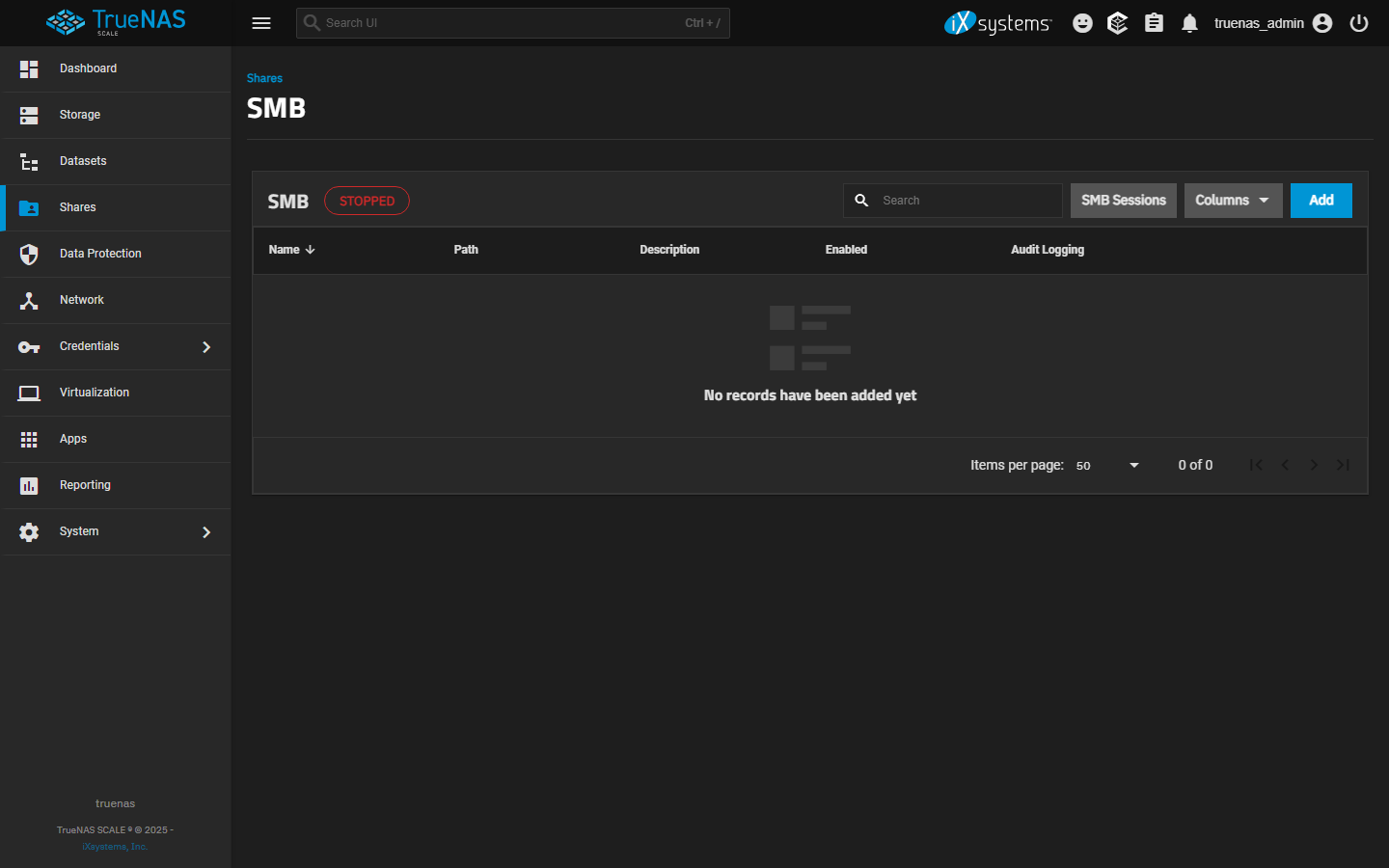
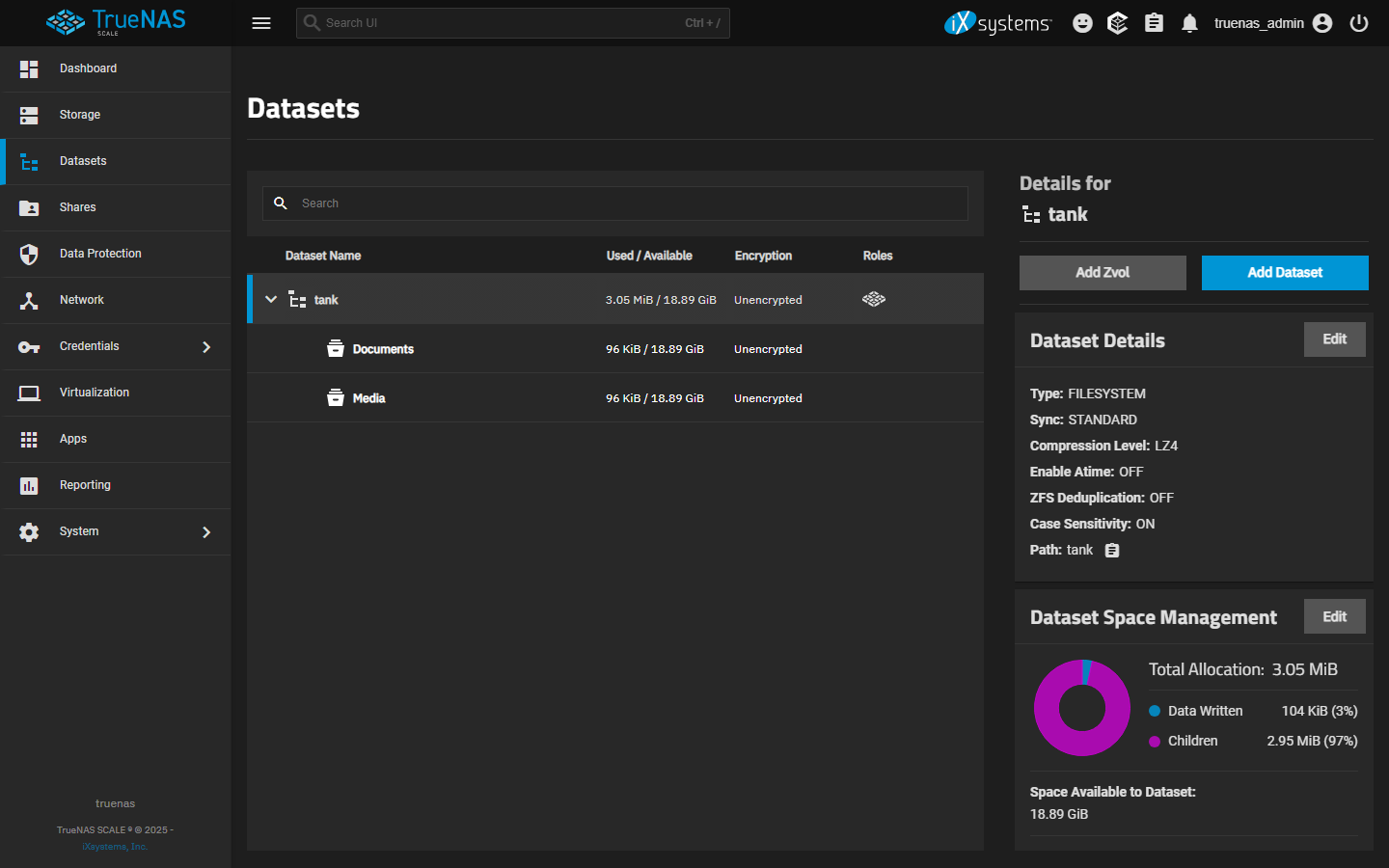
TrueNAS SMB service is running.
`Test-NetConnection -ComputerName <truenas-host> -Port 445` and `Test-NetConnection -ComputerName <truenas-ip> -Port 445`
Services > SMB > status indicator is green.
Stop before disabling all SMB signing — security tradeoff; `auto` is the right home default.
Layer path
Step-by-step runbook
Start here. Do each check in order, compare it to the expected result, and stop when the evidence explains the failure or the safe stop point applies.
Confirm Layer 1: client can reach TrueNAS on port 445
Check: `Test-NetConnection` against hostname and IP; clear Credential Manager if password recently changed.
Expected result: Both reachability tests succeed; no stale credentials cached.
If not: Layer-1 failures cascade — fix here before going deeper.
Confirm Layer 2: TrueNAS SMB service running and share definition correct
Check: Services > SMB > running. Shares > Windows Shares > the share > path correct, Enabled, not Read-Only unless intended, user in allowed list.
Expected result: Service running and share configured correctly.
If not: If service stopped or share misconfigured, fix here before checking dataset permissions.
Confirm Layer 3: ZFS dataset permission grants the user appropriate access
Check: Storage > pool > dataset > Edit Permissions > user entry present with right access level. Apply Permissions Recursively if changes are made.
Expected result: Dataset ACL includes the user; subfolders inherit.
If not: Most home failures land here — share allows but dataset denies.
Clear Windows-side SMB session cache and retest
Check: `net use * /delete` on the client; reconnect to the share; attempt the access that was failing.
Expected result: Access succeeds.
If not: If still denied after this, escalate back to layer 2 or 3 — change didn't apply or wasn't sufficient.
Confirm protocol/signing alignment if performance is poor
Check: Service > SMB > Configure > Server Minimum Protocol >= SMB2_02. Client `Get-SmbServerConfiguration` shows SMB2/SMB3 enabled.
Expected result: Both sides negotiate SMB2/SMB3.
If not: If client falls back to SMB1, disable SMB1 explicitly on both sides.
Safe stop: Stop before disabling all SMB signing — security tradeoff; `auto` is the right home default.
Did this solve your problem?
Your answer helps us improve this page.
No account or personal details. We store the page, answer, optional reason and day with a 90-day retention period. A random reference in this browser prevents repeat votes. Feedback privacy
Decision tree
If: `Test-NetConnection` fails on port 445.
Then: Layer 1 problem — network or firewall.
Action: Verify same-subnet; check Windows Firewall rules; check router-level isolation (some 'guest networks' block intra-subnet SMB).
If: Port 445 works but credential prompt fails.
Then: Layer 1 — Credential Manager caching or password mismatch.
Action: Clear Credential Manager entry; try `net use \\<host>\<share> /user:<truenas-user>` with explicit credentials.
If: Authentication succeeds but access denied to specific paths.
Then: Layer 2 or 3 — share-level or dataset-level permission gap.
Action: Compare share ACL (Shares > Windows Shares > Edit > ACL) with dataset ACL (Storage > dataset > Edit Permissions). Either layer can be the deny source.
If: Permission change made but doesn't take effect on Windows.
Then: SMB session is cached on the Windows side.
Action: `net use * /delete` on the client; reconnect; retest.
If: Share works from one Windows machine but not another.
Then: Layer 1 — client-side variance (Credential Manager, SMB protocol version, network path).
Action: Compare the working and failing client's `Get-SmbServerConfiguration` output and Credential Manager entries.
If: Share visible in `\\<host>\` listing but file access fails.
Then: Layer 3 — dataset-level read denial.
Action: Add the user to dataset ACL with at least Read & Execute; tick Apply Recursively.
Evidence table
| Symptom | Evidence to collect | Likely layer | Next action |
|---|---|---|---|
| `Test-NetConnection` fails on hostname; succeeds on IP. | PowerShell `Test-NetConnection -ComputerName <hostname> -Port 445`. | DNS resolution | Set DHCP reservation for TrueNAS; verify hostname resolves on the client. |
| `net use` with explicit `/user:` works; cached connection doesn't. | Compare cached connection failure vs explicit `/user:` success. | Credential Manager stale entry | Clear Credential Manager entry for the host; reconnect. |
| User missing from share ACL but present on dataset ACL. | Shares > share > Edit > ACL screen. | Share-level ACL gap | Add user to share ACL; the dataset-level permission was already correct. |
| User present in both ACLs but access still denied to specific subfolder. | Storage > pool > dataset > Edit Permissions > subfolder ACL inspection. | Non-inherited subfolder permission | Apply Permissions Recursively from the dataset root; the subfolder had its own ACL that overrode inheritance. |
| Performance much slower on Windows than Mac. | Compare SMB-signing config between client and server. | SMB signing or fallback to SMB1 | Confirm Server Minimum Protocol >= SMB2_02; disable SMB1 explicitly; check `smb signing = auto` (not mandatory for home). |
Commands and settings paths
Test SMB reachability from Windows
`Test-NetConnection -ComputerName <truenas-host> -Port 445` and `Test-NetConnection -ComputerName <truenas-ip> -Port 445`Where: PowerShell on the Windows client.
Expected: Both return TcpTestSucceeded : True.
Failure means: Hostname-fail + IP-success = DNS; both fail = network path.
Safe next step: Fix DNS or firewall before troubleshooting deeper.
Clear stale Windows credentials
Control Panel > Credential Manager > Windows Credentials > Remove any entry naming the TrueNAS host. Then `net use * /delete` in cmd/PowerShell.Where: On the Windows client.
Expected: Subsequent connection prompts for credentials fresh.
Failure means: Stale credentials produce phantom access-denied failures.
Safe next step: Reconnect with current TrueNAS credentials.
Verify dataset-level ACL
Storage > pool > dataset > Edit Permissions > review entries for the affected user; ensure Read & Execute (browse) or Modify/Full Control (write) is granted.Where: In the TrueNAS web UI.
Expected: User has explicit entry with appropriate access level.
Failure means: Missing entry = deny via default.
Safe next step: Add user entry; tick Apply Permissions Recursively; save.
Apply dataset permissions recursively
Storage > pool > dataset > Edit Permissions > make changes > tick Apply Permissions Recursively > Save.Where: In the TrueNAS web UI.
Expected: Subfolders inherit the new ACL.
Failure means: Without recursive apply, subfolders keep their old ACLs and silently deny access.
Safe next step: Confirm on the Windows side after applying — may need `net use * /delete` + reconnect to drop cached session.
Hardware and platform boundary
Change only when
- AD integration is the right next step only when there are 3+ Windows clients with consistent users needing single-sign-on — for 1-2 clients, local SMB users on TrueNAS are simpler and have fewer failure modes.
Evidence that matters
- Same-subnet network path, DHCP reservation for the TrueNAS, and Restricted ACL mode on SMB-only datasets matter most.
Evidence that does not matter
- Newer Windows client OS doesn't fix layer-3 permission gaps; faster network doesn't fix Credential Manager caching.
Avoid
- Avoid disabling guest auth blocking on the client, granting Full Control to Everyone on the dataset, or disabling SMB signing entirely.
Last reviewed
2026-05-18 · Reviewed by HomeTechOps. Reviewed against TrueNAS Scale's SMB Adding SMB Shares tutorial, the Windows SMB protocol guidance from Microsoft Learn, and the layer-3 ZFS ACL behavior documented in TrueNAS's permissions tutorials.
Source-backed checks
HomeTechOps turns official docs and conservative safety rules into a shorter runbook. These links are the source trail for the page direction.
Planning a purchase?
We keep a source-backed, price-free comparison so you can buy once and right. No star ratings, every spec cited.
Synology vs UGREEN vs DIY NAS in 2026 →Get the deal & firmware alerts
Home Stack Field Notes: NAS deals, firmware changes worth acting on, restore-test reminders, and new decision guides — plus the capacity & backup sizing cheatsheets from our calculators. Unsubscribe anytime.
Subscribe on beehiiv