
Backups & Storage
TrueNAS Fangtooth/Goldeye upgrade: VM + PCI loss
Pre-upgrade runbook and post-upgrade fixes for TrueNAS Scale 24.10 to 25.04 (Fangtooth) and 25.10 (Goldeye): VM migration, IOMMU regression, BE rollback.
Start here: Land on 24.10.2.4 latest
System > Update > apply current 24.10.x updates.
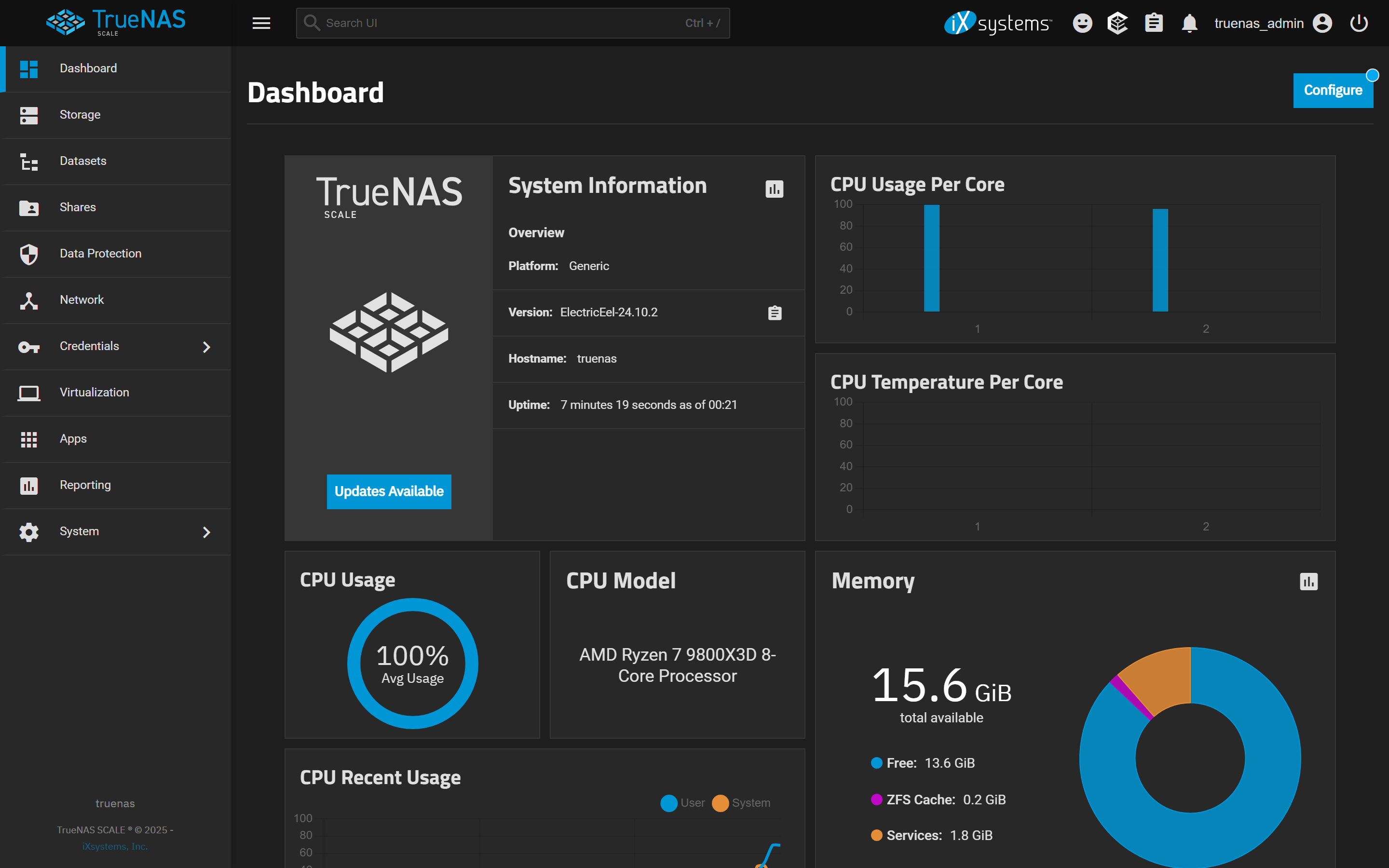
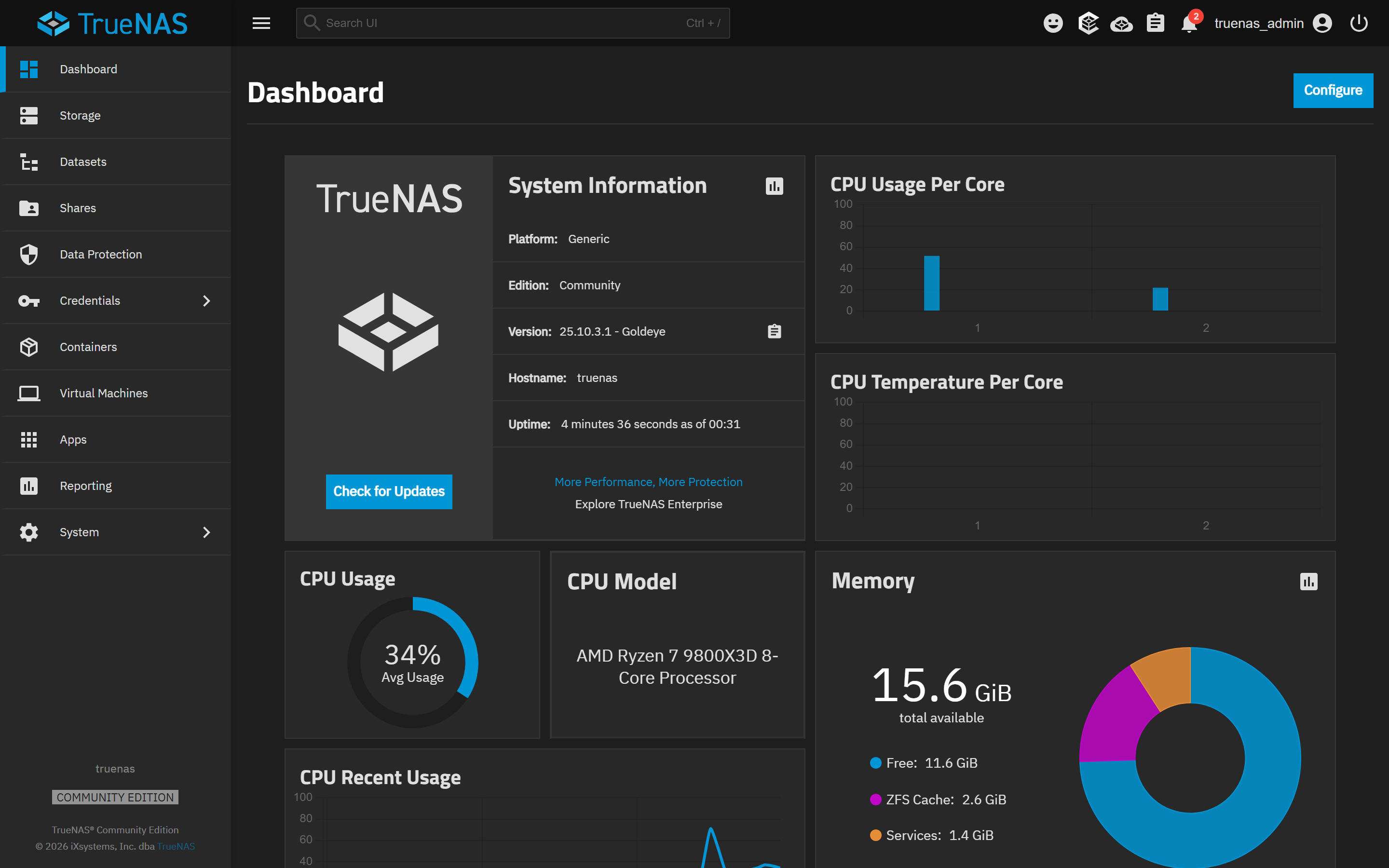
The actual menu split: 24.10 ElectricEel vs 25.10.3.1 Goldeye
Reference images and diagrams. Click any image to view full resolution.
Problem summary
TrueNAS Scale 25.04 (Fangtooth) replaced libvirt VMs with Incus (LXC + QEMU/KVM) and shipped kernel 6.12 with an Intel IOMMU regression that takes LSI SAS3008 HBAs and NVMe pools offline post-upgrade. The 25.04.0 / 25.04.1 releases also had multiple VM migration failures (ghost rows, 'Block volumes cannot be shrunk' errors). 25.10 Goldeye is the current stable (25.10.2 since February 2026, 25.10.3.1 since May 2026), and iX supports the direct 24.10 → 25.10 path. If you're on 24.10 today, the question isn't 'should I upgrade to Fangtooth' — it's 'do I land on 25.04.2+ as a stepping stone, or jump directly to 25.10 Goldeye?' This page covers both paths and the failure modes that apply to either.
On 24.10.2.4 (latest 24.10 maintenance).
System > Info Center > General
System > Info Center shows TrueNAS Scale 24.10.2.4.
Stop before applying 25.04.0 / 25.04.1 — both had VM-loss bugs.
Layer path
Step-by-step runbook
Start here. Do each check in order, compare it to the expected result, and stop when the evidence explains the failure or the safe stop point applies.
Land on 24.10.2.4 latest
Check: System > Update > apply current 24.10.x updates.
Expected result: TrueNAS Info Center shows 24.10.2.4 or newer 24.10 build.
If not: Older 24.10 builds can't jump directly to 25.04.2+ — must update through the train.
Pre-upgrade documentation + backups
Check: Export config (with password secret seed); document VMs + PCI passthrough + app dataset paths; recursively snapshot every dataset as `pre-fangtooth-<date>`; replicate off-box if possible; install virtio-win in Windows VMs; remove SMB aux parameters; note current BE name.
Expected result: All documentation saved off-box; snapshots exist; Windows VMs have virtio drivers; aux params removed.
If not: Stop here if you can't replicate snapshots off-box and your only copy of irreplaceable data is on this NAS.
Upgrade directly to 25.04.2+ (or 25.10.x stable)
Check: System > Update > select 25.04.2+ train (or 25.10 Goldeye). Do not apply 25.04.0 or 25.04.1 first.
Expected result: System reboots; new BE active; old 24.10.2.4 BE still listed.
If not: If the upgrade fails to download, check internet + iX update servers; retry.
Safe stop: Stop before applying 25.04.0 / 25.04.1 — both had VM-loss bugs.
Post-reboot verification
Check: Ctrl+F5 the UI; verify dashboard healthy; pools online; network up; re-add SMB aux parameters; check Virtualization screen (VMs auto-migrated to classic UI); check Apps; verify PCI passthrough.
Expected result: All services green; no offline pools; VMs visible and startable.
If not: If pools offline → IOMMU regression; apply intel_iommu=off OR roll back BE.
Start VMs one at a time; verify each
Check: Virtualization > each VM > Start > console in.
Expected result: Each VM boots and reaches login. Windows guests: network works (virtio-net loaded).
If not: If VM fails to start: ghost row (delete + recreate), or zvol shrink error (detach zvol + recreate VM).
Defer zpool upgrade for at least 2 weeks
Check: Storage > Pools > leave at current ZFS version. Do not run `zpool upgrade`.
Expected result: Pool feature flags unchanged from 24.10.
If not: Upgrading the pool now removes BE rollback ability. Run for 2+ weeks first, validate everything, then upgrade pool flags individually.
Safe stop: Stop if you're tempted to `zpool upgrade` to enable new flags immediately — wait.
Did this solve your problem?
Your answer helps us improve this page.
No account or personal details. We store the page, answer, optional reason and day with a 90-day retention period. A random reference in this browser prevents repeat votes. Feedback privacy
Decision tree
If: On 24.10.2.4, simple setup (no VMs, no PCI passthrough).
Then: Low-risk upgrade. Target Goldeye directly.
Action: Update directly to 25.10.2+ (current stable). Single upgrade window. Rollback path is the BE switch.
If: On 24.10.2.4 with VMs + PCI passthrough.
Then: Higher-risk upgrade; community has documented multiple regression patterns.
Action: Document everything per the runbook; take snapshots; step via 25.04.2+ (skip 25.04.0/.1), settle 2 weeks, then go to 25.10.2+. Two windows = smaller blast radius per upgrade.
If: Already on 25.04 Fangtooth and considering 25.10 Goldeye.
Then: Much smaller hop than 24.10 → 25.04 was; both use Incus.
Action: Same pre-upgrade discipline (snapshots, BE name, document VMs). Apply 25.10.2+ via System > Update. Mostly inheriting bug fixes; no further VM migration required.
If: Post-upgrade: pools offline / drives missing.
Then: Kernel 6.12 IOMMU regression.
Action: Edit GRUB to add `intel_iommu=off` to cmdline; reboot. Or roll back BE if you didn't `zpool upgrade`.
If: Post-upgrade: VM shows 'ENOENT' / ghost row in Virtualization tab.
Then: libvirt → Incus migration record orphaned.
Action: Delete the ghost row. Recreate the VM from documented specs. Attach existing zvol as disk.
If: Post-upgrade: VM disk 'cannot be shrunk' error.
Then: Block volume mismatch between old and new VM record.
Action: Detach zvol, delete VM, recreate VM with correct root disk size, reattach data zvol.
If: Post-upgrade: Windows VM has no network.
Then: Missing virtio-net inside guest.
Action: Boot recovery ISO with virtio drivers; install virtio-net inside the guest.
Evidence table
| Symptom | Evidence to collect | Likely layer | Next action |
|---|---|---|---|
| TrueNAS dashboard shows 'Offline Vdevs' on the pool widget after upgrade. | Storage > Pools shows specific drives offline; Logs show `multipathd` or `mpt3sas` errors. | Kernel 6.12 IOMMU regression | Add `intel_iommu=off` to GRUB cmdline + reboot. Or roll back BE. |
| Virtualization tab shows VM with no power status / ENOENT error on start. | Per-VM detail panel shows the row but actions fail. | libvirt → Incus migration orphaned the record | Delete the ghost record; recreate VM from documented specs. |
| SMB shares fail to come up after upgrade. | Sharing > SMB shows shares but clients can't connect. | SMB auxiliary parameters not migrated cleanly | Remove + re-add aux parameters per share. |
| Apps showed Running on 24.10 but show NotReady or restart-looping on 25.04. | Apps tab; check pod logs. | App migration data path issue or missing custom config | Re-pull image; restore from `pre-fangtooth-<date>` snapshot if needed. |
Commands and settings paths
Capture current version pre-upgrade
System > Info Center > GeneralWhere: TrueNAS web UI.
Expected: Reports TrueNAS Scale 24.10.2.4 or later 24.10 build.
Failure means: Older 24.10 builds need to update first before going to Fangtooth.
Safe next step: Update via System > Update to current 24.10 latest before proceeding.
Export config + password secret seed
System > General > Manage Configuration > Download File (tick 'Export Password Secret Seed')Where: TrueNAS web UI.
Expected: Config file downloaded; saved off-box.
Failure means: Without this, fresh-install rollback can't restore state.
Safe next step: Copy to NAS / cloud / USB before proceeding.
Capture PCI device mapping
Shell > `lspci -nn > /tmp/pci-pre-fangtooth.txt`Where: Via SSH or System > Shell.
Expected: File contains the full PCI device list with IDs and IOMMU groups.
Failure means: Without this, kernel 6.12 regression triage means manually rebuilding the device list.
Safe next step: Save off-box.
Snapshot every dataset recursively
Datasets > select pool > More > Snapshot > Recursive; name `pre-fangtooth-<date>`Where: TrueNAS web UI.
Expected: All datasets show a snapshot with the matching name.
Failure means: Without snapshots, corrupted app data after upgrade is unrecoverable except via off-box backup.
Safe next step: Hold all snapshots; disable replication retention for these specific snapshots.
Note current boot environment name
System > Boot > note the active BE name (e.g. `24.10.2.4`)Where: TrueNAS web UI.
Expected: BE name captured.
Failure means: This is your rollback target. If BE name changes during upgrade, rollback path is lost.
Safe next step: Don't delete the old BE post-upgrade until you've validated Fangtooth for a week+.
Hardware and platform boundary
Change only when
- Upgrade from Electric Eel to Fangtooth (or Goldeye) when iX positions the target as production-ready AND your specific hardware combination is reported clean in the forum AND you have working off-box snapshot replication.
Evidence that matters
- Target 25.04.2.6+ for Fangtooth or 25.10.2+ for Goldeye. Verify your HBA model + IOMMU behavior post-upgrade. Confirm VM passthrough still works.
Evidence that does not matter
- Newer hardware doesn't change the upgrade path risks — the regressions are software, not hardware.
Avoid
- Don't apply 25.04.0 or 25.04.1 — both shipped with VM-loss bugs. Don't `zpool upgrade` immediately after the OS upgrade. Don't activate a FreeBSD/Core BE from Scale — bricks the system.
Related tool/checklist
Use the linked tool when you need a guided plan from your exact symptoms instead of a static checklist.
NAS storage and backup plannerRelated problems
Last reviewed
2026-05-18 · Reviewed by HomeTechOps. Reviewed against iX Systems' official TrueNAS Scale 25.04 (Fangtooth) and 25.10 (Goldeye) release notes, the forums.truenas.com VM-migration and PCI-device threads (39965, 44042, 50379, 47668, 39359), and the TrueNAS software status page. Boot-environment rollback procedure verified against truenas.com/docs/scale/25.04/scaletutorials/systemsettings/managebootenvironscale/.
Sources/assumptions
- Page state reflects TrueNAS Scale Fangtooth 25.04.2+ and Goldeye 25.10.2 (stable as of February 2026). Earlier Fangtooth releases (25.04.0, 25.04.1) had multiple known VM-loss bugs documented in TrueNAS Community threads.
- Kernel 6.12 IOMMU regression is hardware-specific — LSI SAS3008 HBAs and certain NVMe-pool configurations. Other PCI passthrough may not be affected.
- BE rollback only protects the boot pool (TrueNAS OS). Storage pool data integrity depends on the dataset snapshots taken pre-upgrade, not the BE.
Source-backed checks
HomeTechOps turns official docs and conservative safety rules into a shorter runbook. These links are the source trail for the page direction.
Planning a purchase?
We keep a source-backed, price-free comparison so you can buy once and right. No star ratings, every spec cited.
Synology vs UGREEN vs DIY NAS in 2026 →Get the deal & firmware alerts
Home Stack Field Notes: NAS deals, firmware changes worth acting on, restore-test reminders, and new decision guides — plus the capacity & backup sizing cheatsheets from our calculators. Unsubscribe anytime.
Subscribe on beehiiv